Strategy 9.2.0 introduces the ability for Distribution Services to deliver files from an Intelligence Server running in UNIX/Linux to a Windows file server. Sharity, a third-party application facilitate the delivery. Sharity allows the mounting and un-mounting of Windows UNC (Universal Naming Convention) paths on a UNIX machine. The process is completely transparent to the end-user and does not require changes to the address syntax used for Windows locations (e.g., \\Windows-fs01).
Setup and configuration
1. Install and configure Sharity on the UNIX machine where Strategy Intelligence Server 9.2.0 is running. For information on purchasing, installing and using Sharity, see their website: http://www.obdev.at/products/sharity/index.html
2. In Strategy Desktop, connect to the Project Source and go to Administration > Delivery Managers > Devices > File Location > Edit.
3. Select the Cross-Platform Delivery with Sharity(TM) tab.
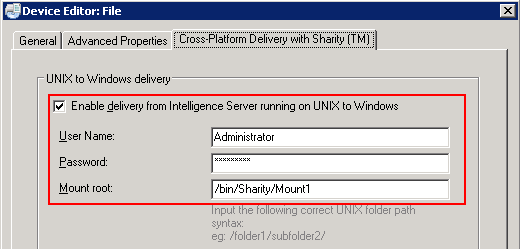
4. Select Enable delivery from Intelligence Server running on UNIX to Windows.
5. Enter the User Name and Password.
6. In the Mount Root field, enter the UNIX path (on the Intelligence Server machine where the mount is stored). For example: /bin/Sharity/Mount1
7. Click OK to Save.
Further Reading
Third Party Software Installation:
WARNING:
The third-party product(s) discussed in this technical note is manufactured by vendors independent of Strategy. Strategy makes no warranty, express, implied or otherwise, regarding this product, including its performance or reliability.
KB410698
