EducationSoftwareStrategy.com
StrategyCommunity

Knowledge Base

Product

Community

Knowledge Base

TopicsBrowse ArticlesDeveloper Zone

Product

Download SoftwareProduct DocumentationSecurity Hub

Education

Tutorial VideosSolution GalleryEducation courses

Community

GuidelinesGrandmastersEvents
x_social-icon_white.svglinkedin_social-icon_white.svg
Strategy logoCommunity

© Strategy Inc. All Rights Reserved.

LegalTerms of UsePrivacy Policy
  1. Home
  2. Topics

KB41070: "Health center is not able to obtain the user account groups information on the machine" message appears when running directory permission check for Intelligence Server using a non-administrator Windows user in MicroStrategy Health Center 10.x


Community Admin

• Strategy


"Health center is not able to obtain the user account groups information on the machine" message appears when running directory permission check for Intelligence Server using a non-administrator Windows user in MicroStrategy Health Center 10.x

SYMPTOM:
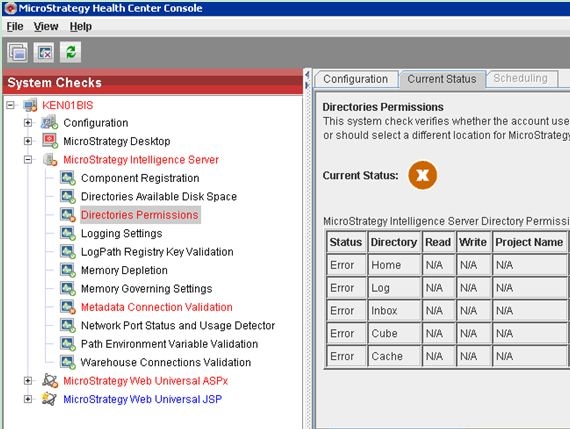
In Strategy Health Center 10.x, the following error appears when conducting system checks for Strategy Intelligence Server using an Windows user who doesn't have access permission to directories, as shown below:
 

ka04W000000OfkUQAS_0EM4400000029jZ.jpeg

 
The error message:


Healthe center is not able to obtain the user account groups information on the machine due to either (1) the current accoun running health center does not have the privilege (i.e. local sstem account) to get the account group information or (2)an error has occurred with the exception message: System error 1312 has occurred
CAUSE:
In directory permission check for Strategy Intelligence Server, Strategy Health Center checks the permission to those directories under installation home, like log ,Inbox, Cube and cache folders. Health Center uses the Window account running Intelligence server to check directory permission. When the windows user does not have access permission to those directories, the issue happens.
 
ACTION:
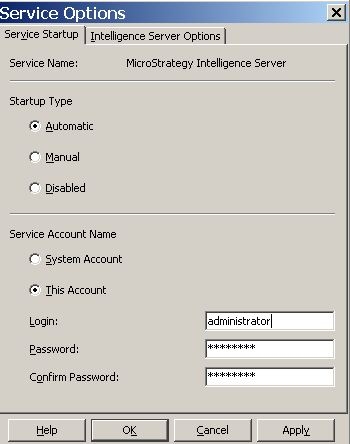
Run Strategy Intelligence Server using an administrator user who has permission to access directories under installation home, as shown below:
 

ka04W000000OfkUQAS_0EM4400000029ja.jpeg


Comment

0 comments

Details

Knowledge Article

Published:

June 11, 2017

Last Updated:

February 28, 2018