EducationSoftwareStrategy.com
StrategyCommunity

Knowledge Base

Product

Community

Knowledge Base

TopicsBrowse ArticlesDeveloper Zone

Product

Download SoftwareProduct DocumentationSecurity Hub

Education

Tutorial VideosSolution GalleryEducation courses

Community

GuidelinesGrandmastersEvents
x_social-icon_white.svglinkedin_social-icon_white.svg
Strategy logoCommunity

© Strategy Inc. All Rights Reserved.

LegalTerms of UsePrivacy Policy
  1. Home
  2. Topics

KB41112: When exporting reports from MicroStrategy Developer 9.x or 10.x to Excel 2007 or 2010, the “no fill” color in Desktop is incorrectly being exported as a white fill in Excel.


Stefan Zepeda

Salesforce Solutions Architect • Strategy


KB41112: When exporting reports from MicroStrategy Developer 9.x or 10.x to Excel 2007 or 2010, the “no fill” color in Desktop is incorrectly being exported as a white fill in Excel.

SYMPTOM:
 
When exporting a report from desktop to Excel, the default fill color for a “no fill” cell in desktop will be set to white in excel.
 
Cannot uncheck the “apply formatting” button when exporting because users need formatting for other cells.
 
In 9.0.2, the “no fill” in desktop will show up correctly as “no fill” when exporting to Excel.
 
 
 STEPS TO REPRODUCE:
 
 
1.     In 9.x and 10.x, open Customer Income Analysis from ”Strategy Tutorial\Public Objects\Reports\Subject Areas\Customer Analysis”
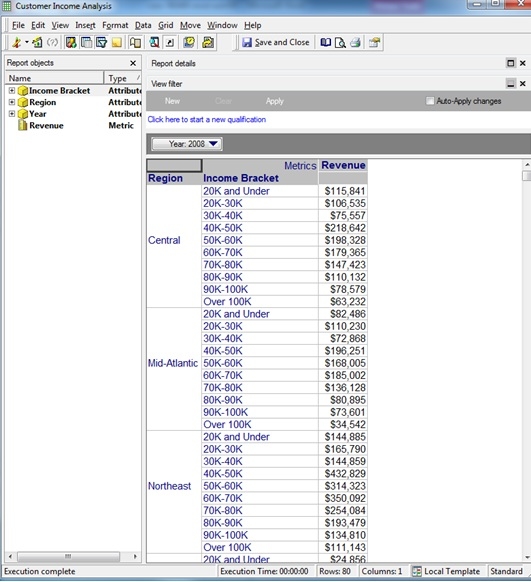
 

ka02R000000kXGiQAM_0EM440000002D7L.jpeg


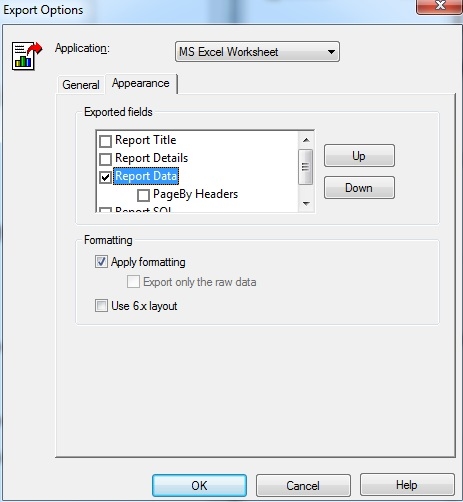
2.     Click Data->Export Options->Appearance Tab and make sure only “report data” is checked. Click “OK”


ka02R000000kXGiQAM_0EM440000002D7R.jpeg

 
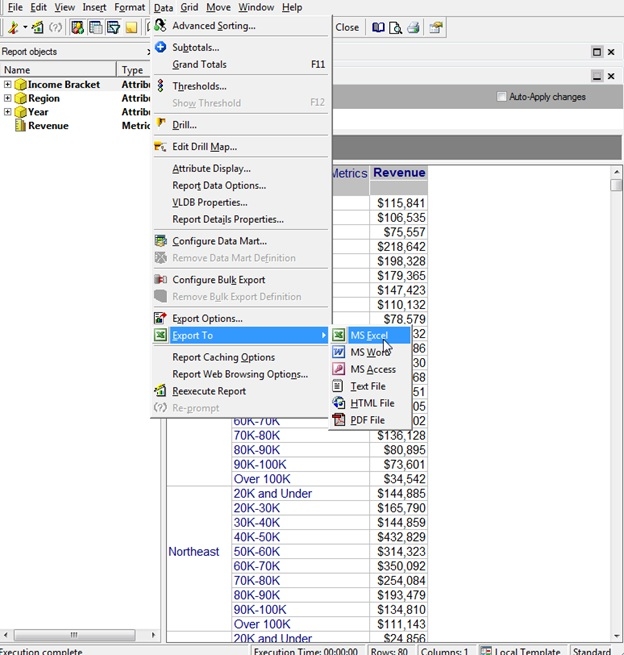
3.     Click data->Export To->MS Excel


ka02R000000kXGiQAM_0EM440000002D7K.jpeg

 
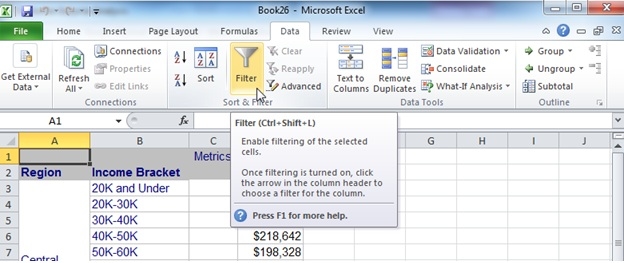
4.     In excel, on the Data tab click the “filter” button
 

ka02R000000kXGiQAM_0EM440000002D7J.jpeg

 
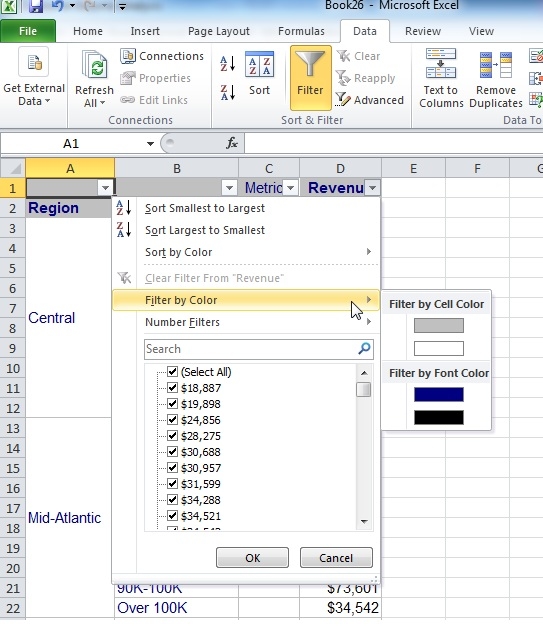
5.     Click any drop down check box that appears in the spreadsheet.  Point to “filter by color”
 

ka02R000000kXGiQAM_0EM440000002D7Q.jpeg


6.     There is no “no fill” option in excel because the “no fill” background in desktop was exported to white in excel.
 

ka02R000000kXGiQAM_0EM440000002D7O.jpeg

 
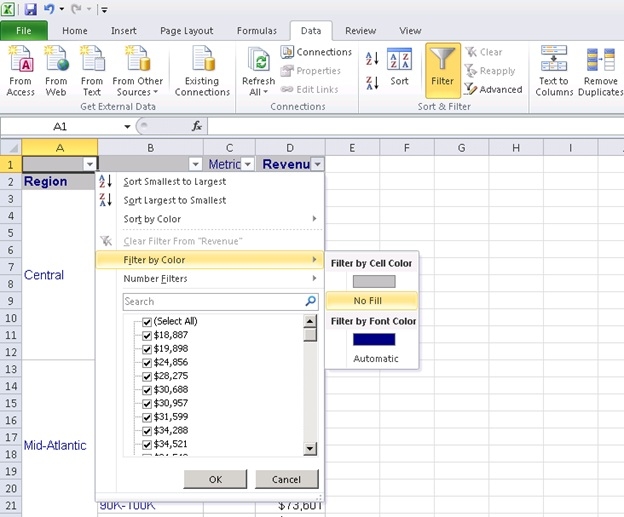
7.     Repeat steps 1-6 except this time do it in 9.0.2.
 
8.     There is a “no fill” in excel because the “no fill” in desktop was exported correctly to a “no fill” in excel.
 

ka02R000000kXGiQAM_0EM440000002D7P.jpeg

 
Cause:
 
This is a known issue in Developer 9.x or 10.x
Action:
Contact Strategy Technical Support for an update on this issue.
 
Workaround:
Export report in Strategy Web


Comment

0 comments

Details

Knowledge Article

Published:

June 19, 2017

Last Updated:

June 19, 2017