EducationSoftwareStrategy.com
StrategyCommunity

Knowledge Base

Product

Community

Knowledge Base

TopicsBrowse ArticlesDeveloper Zone

Product

Download SoftwareProduct DocumentationSecurity Hub

Education

Tutorial VideosSolution GalleryEducation courses

Community

GuidelinesGrandmastersEvents
x_social-icon_white.svglinkedin_social-icon_white.svg
Strategy logoCommunity

© Strategy Inc. All Rights Reserved.

LegalTerms of UsePrivacy Policy
  1. Home
  2. Topics

KB41138: Windows authentication does not work in MicroStrategy Web using IE browser on IIS web server


Community Admin

• Strategy


Windows authentication does not work in MicroStrategy Web using IE browser on IIS web server

SYMPTOM:
 
Windows authentication does not work in Strategy Web using IE browser on IIS web server. The login credential is prompted constantly when correct user name and password is input.
 
NOTE: The issue does not happen using other browsers than IE, like Firefox or Google Chrome.
 
 
CAUSE:
 
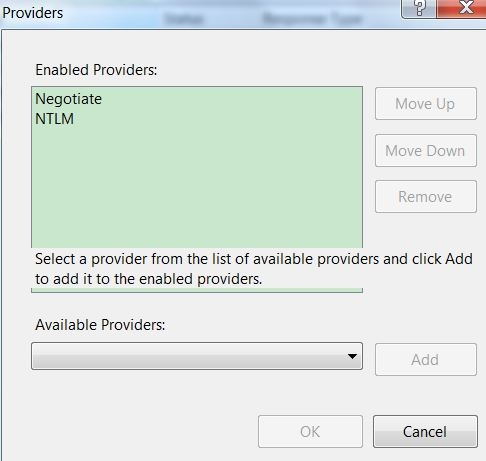
One possible cause is that in IIS manager, "Negotiate" is on the top of list in Authentication->Windows Authentication->Providers, as shown below:
 

ka04W000000OacVQAS_0EM44000000270v.jpeg

 
NOTE: IE browser uses Kerberos logon. Other browsers use NTLM directly.
 
 
ACTION:
 
In IIS Authentication Provider dialog, make sure NTLM is on the top of enabled provider list.
 
 
KB41138


Comment

0 comments

Details

Knowledge Article

Published:

June 6, 2017

Last Updated:

December 29, 2018