EducationSoftwareStrategy.com
StrategyCommunity

Knowledge Base

Product

Community

Knowledge Base

TopicsBrowse ArticlesDeveloper Zone

Product

Download SoftwareProduct DocumentationSecurity Hub

Education

Tutorial VideosSolution GalleryEducation courses

Community

GuidelinesGrandmastersEvents
x_social-icon_white.svglinkedin_social-icon_white.svg
Strategy logoCommunity

© Strategy Inc. All Rights Reserved.

LegalTerms of UsePrivacy Policy
  1. Home
  2. Topics

KB41148: MicroStrategy queries all the columns from all tables when running a Visual Insight dashboard with a custom group in the filter panel or filter visualization and unchecking one custom group filter element in MicroStrategy Web 10.4


Community Admin

• Strategy


SYMPTOM:
Strategy queries all the columns from all tables when running a VI dashboard with a custom group in the filter panel or filter visualization and unchecking one custom group filter element in Strategy Web 10.4.
 
STEPS TO REPRODUCE:
  • Enable the SQL trace log, by following the KB13189: How to trace the SQL generated by MicroStrategy Engine 9.x .
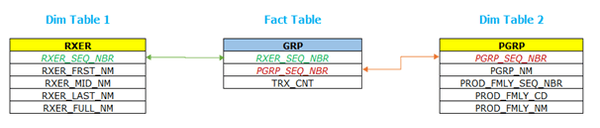
  • In Strategy Web, import data of 3 tables through the import data feature and link them to create a live connection data model, for example:
ka04W000000OfrgQAC_0EM4400000025P0.jpeg
  • Save the imported data cube as a live connection.
  • Create a Visual Insight dashboard based on the previous cube.
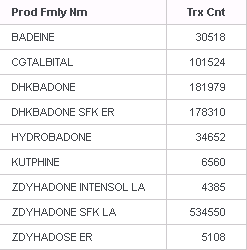
  • Add an attribute from the previous cube to the rows and a metric to the columns of the grid visualization.
ka04W000000OfrgQAC_0EM4400000025P9.jpeg
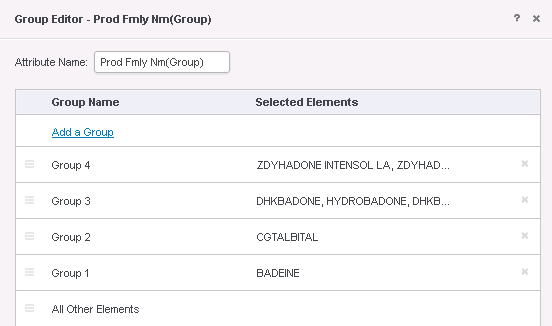
  • Create a custom group based on the above attribute, like shown below:
ka04W000000OfrgQAC_0EM4400000025Oy.jpeg
  • Add the custom group as a filter panel or the filter visualization section.
  • Uncheck one of the custom group filter items and note that Strategy queries all the columns form all tables, instead of doing a query just for the table where the attribute is coming from, like shown below:


select          a11.RXER_SEQ_NBR RXER_SEQ_NBR,
                a12.RXER_FRST_NM [Rxer Frst Nm],
                a12.RXER_MID_NM [Rxer Mid Nm],
                a12.RXER_LAST_NM [Rxer Last Nm],
                a12.RXER_FULL_NM [Rxer Full Nm],
                a11.PGRP_SEQ_NBR PGRP_SEQ_NBR,
                a13.PGRP_NM PGRP_NM,
                a13.PROD_FMLY_SEQ_NBR PROD_FMLY_SEQ_NBR,
                a13.PROD_FMLY_NM PROD_FMLY_NM,
                a13.PROD_FMLY_CD PROD_FMLY_CD,
                a11.TRX_CNT WJXBFS4
from            dbo.GRP    a11
join            dbo.RXER    a12
  on            (a11.RXER_SEQ_NBR = a12.RXER_SEQ_NBR)
join            dbo.PGRP    a13
  on            (a11.PGRP_SEQ_NBR = a13.PGRP_SEQ_NBR)

 
CAUSE:
This is a known issue with Strategy Web 10.4. 
 
ACTION: 
This issue has been fixed in Strategy Web 10.8, upgrade to this version to take advantage of the fix
 

KB01148


Comment

0 comments

Details

Knowledge Article

Published:

June 13, 2017

Last Updated:

May 1, 2018