EducationSoftwareStrategy.com
StrategyCommunity

Knowledge Base

Product

Community

Knowledge Base

TopicsBrowse ArticlesDeveloper Zone

Product

Download SoftwareProduct DocumentationSecurity Hub

Education

Tutorial VideosSolution GalleryEducation courses

Community

GuidelinesGrandmastersEvents
x_social-icon_white.svglinkedin_social-icon_white.svg
Strategy logoCommunity

© Strategy Inc. All Rights Reserved.

LegalTerms of UsePrivacy Policy
  1. Home
  2. Topics

KB41151: How to prevent Distribution Services from attaching extra HTML files when sending an email?


Community Admin

• Strategy


When sending emails generated from MicroStrategy 10.x either through "Send Now" or through a subscription, the message will sometimes include extra attachment files besides the report being delivered; usually these are the HTML files for the body of the email.

When sending emails generated from Strategy 10.x either through "Send Now" or through a subscription, the message will sometimes include extra attachment files besides the report being delivered; usually these are the HTML files for the body of the email.
 
Is there a way to prevent Strategy Distribution Services from attaching these HTML files and only show the report file in the email attachments?  
 
It is possible to remove this unnecessary attachments, follow the steps below to change the devices under Delivery Managers in Strategy Developer 10.x:
 
1. In Strategy Developer expand the Administration gear icon.
2. Inside Delivery Manager > Devices edit the device used to send email.
3. Click on Options.
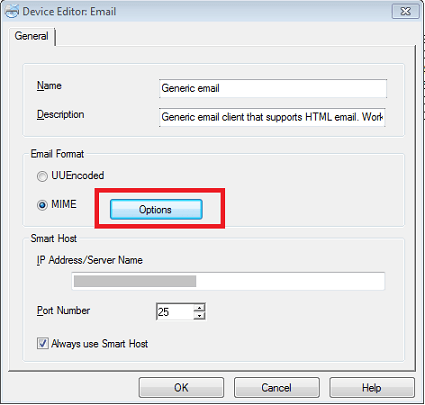


ka04W00000148tKQAQ_0EM4400000029j8.png

 
4. Select the options to "embed HTML attachments."
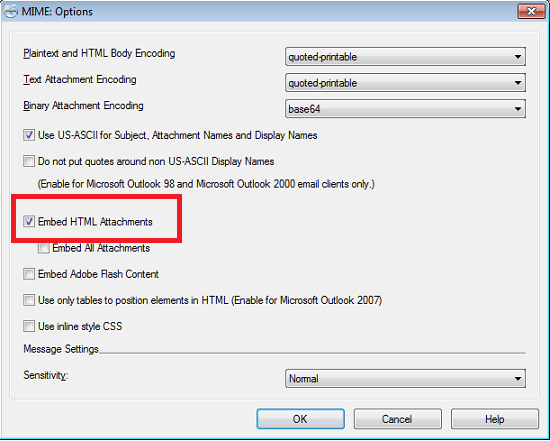


ka04W00000148tKQAQ_0EM4400000029j5.png

 
Now HTML files for the content of the email will not be displayed in the attachments.


Comment

0 comments

Details

Knowledge Article

Published:

June 11, 2017

Last Updated:

November 19, 2019