SYMPTOM:
Consider the screenshots below. They are both exports to Excel from Strategy Web 9.2.1

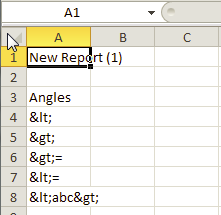
The difference is that the image on the left is using the export to "Excel with formatting" export option and the image on the right is using the export to "Excel with plain text" export option. Notice that the angle brackets display correctly when exported to Excel with formatting but are garbled when exported in plain text. If exported in CSV format the angle brackets will be garbled as well.
The following screenshot shows the problematic export options "Excel with plain text" and "CSV file format":

This behavior is seen in Strategy Web 9.2.1. Exports of the same reports from Desktop work without a problem.
CAUSE:
This behavior is occuring by design. The reason that the angle brackets - or other special characters - are displaying incorrectly in plain text and CSV exports to Excel is that a web server security setting is not enabled. This setting is called "Allow HTML Output in: Exported text in plain text and CSV formats."
ACTION:
Enable the "Allow HTML Output in: Exported text in plain text and CSV formats" setting by following these steps:
1) Open up Web Administrator to the "Administrator Page" where the connected Intelligent Servers are displayed. Here is a screenshot of this:

2) Click on the "Security" link on the left side of the page. This is highlighted in the red box in the screenshot from step (1) above.
3) In the "User Input Filtering: " section, check the "Exported text in plain text and CSV formats" setting as shown below:
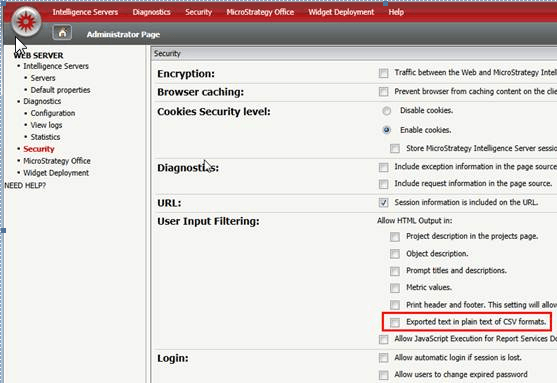
4) Click the "Save" button at the bottom of the page. This should allow HTML output to format correctly in plain text and CSV exports.
