Before 9.3.0 derived elements can be only created in the view template of view report and RWD grid. In 9.3.x the derived elements can also be created in the data template of normal reports and OLAP reports in the Strategy Web view mode. OLAP reports have both data template and view template.
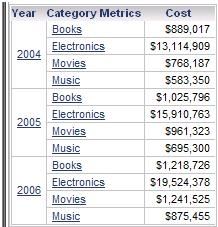
For example, create a report with Year, Category and Cost in Web.
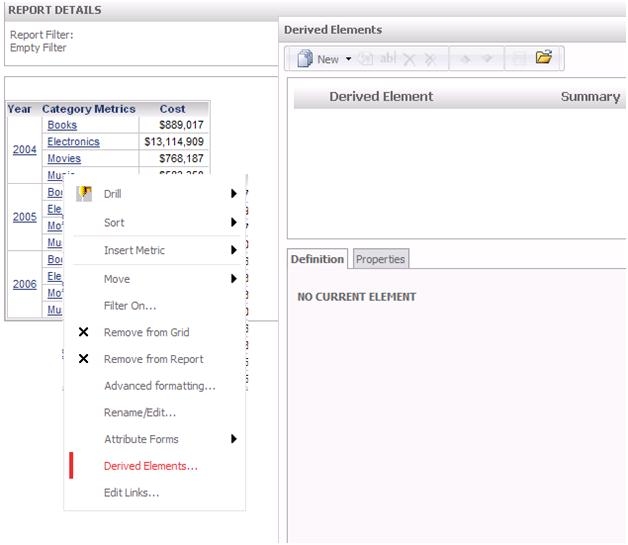
In Strategy Web view mode, right mouse click on Year to create derived elements on Year.
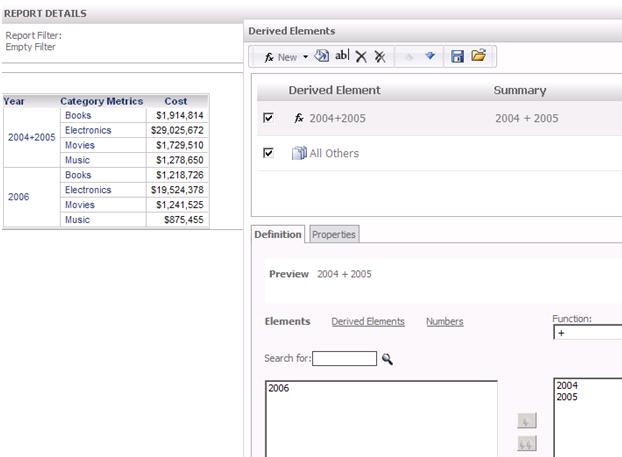
The interface is the same as derived element editor for view template. The sample below is a calculation derived element with the definition is 2004+2005.
However in the Strategy Web design mode, derived elements cannot be defined/modified/deleted. If right mouse click on the attribute, cannot see the option of “Derived elements…”.
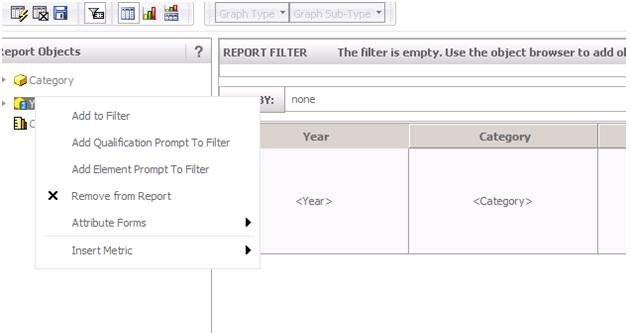
In Strategy Developer, derived elements cannot be defined/modified/deleted in data template while the reports with derived elements in data template can be executed after the derived elements are created through Strategy Web. If right mouse click on the attribute, cannot see the option of “Derived elements…”.

