As of Strategy 9.2.x, there is no way to calculate subtotals for count distinct metrics. Subtotal is calculated by the analytical engine based on one level of result data retrieved by SQL. Distinct counts retrieved from the database cannot be re-aggregated to calculate a meaningful distinct count at a higher level – the higher level values must be calculated by performing another distinct count back against the source data.
There is a new feature in Strategy 9.3.0 called "subtotal from base" which can solve this problem. Cube Subsetting Instruction (CSI) engine generates statements to calculate the subtotal from base. But when derived element is enabled, it is calculated by the Analytical Engine after the CSI, so it cannot affect the result that has been calculated. The subtotal from base value may seem wrong after the derived element is enabled. To prevent the confusion, subtotal from base will return null value for total at derived element level.
The following example discusses how 'subtotal from base' works in a case where derived elements are not used. Create a cube with Region, Year, Customer and Cost. Create a view report based on this cube. In Strategy Web, put Region, Year and Cost in the grid of the view report. Right mouse click on Customer and insert Metric Count. The new derived metric Count(Customer) is a subtotal from base metric. After the total is enabled, the data on the grid is as shown below. For each region, it returns the number of distinct customer and it is not the sum of numbers in the three years for a region. The grand total indicates the number of distinct customers for all the regions and all the years.

From the SQL view, it can be seen that the region level total and grand level total of Metric Count(Customer) is calculated by the statements in red. Pay attention that the first step of Analytical engine calculation steps below is to calculate the total of Cost from the view.
select @,
@,
@,
count(distinct @)@{,} as ,
sum()@{,} as ,
count(distinct @) as ,
count(distinct @)@{} as }]
from Cube Year Region Customer Cost
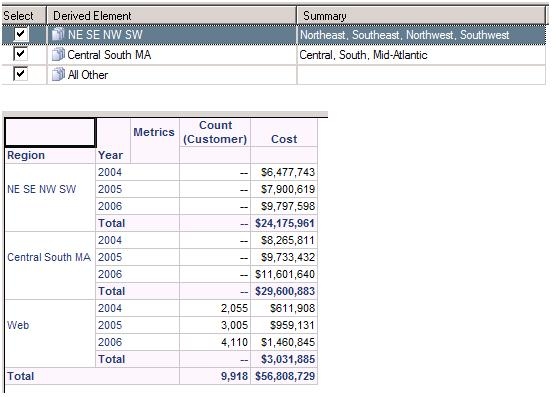
If a derived element is created on Region, the CSI engine calculates the subtotal from base first, and then Analytical engine calculates the derived element (DE) according to the work flow. So the Region DE level subtotal from base cannot be calculated. A null value is seen for Total at Region DE level. For grand total level, the derived elements do not affect the final result when all the elements are checked and can be calculated by CSI engine. This case is referred to as total over derived element level. This is seen in the screen shot below.
Sample Code/Error
select @,
@,
@,
count(distinct @)@{,} as ,
sum()@{,} as ,
count(distinct @) as ,
Dynamic Null Function()@{} as }]
from Cube Year Region Customer Cost
If some derived elements are hidden, the situation is more complicated. When the element 'All Other' is displayed and at least one derived element is hidden, grand total cannot be calculated either.
For the sample above, consolidate all other items into one element 'All Other' and remove Year from grid for simplicity. When all the derived elements including 'All Other' are displayed, the grand level total is returned.

Sample Code/Error
select @,
@,
count(distinct @)@{} as ,
sum()@{} as ,
count(distinct @) as
from Cube Year Region Customer Cost
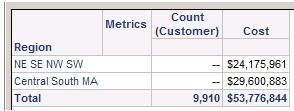
When the 'All Other' element is unchecked, the chosen Region elements are used in the WHERE clause of the CSI. Only the data for seven regions from the cube is selected with the WHERE clause . The grand total of Count(Customer) in grid is the number of distinct customers from the seven regions whose Region_ID in (1,3,6,7,4,5,2). Then, the derived element is calculated by the Analytical Engine.
Sample Code/Error
select @,
@,
count(distinct @)@{} as ,
sum()@{} as ,
count(distinct @) as
from Cube Year Region Customer Cost
where (@ in (1, 3, 6, 7)
or @ in (4, 5, 2))
However if the element "All Other" is checked and ‘Central South MA’ is hidden, CSI does not use a WHERE clause to choose data from the cube. The data of all the regions returns so it cannot calculate the number of distinct customers from the four regions in ‘NE SE NW SW’ and the other left out regions under the element 'All Other'. So, a NULL is displayed for the grand total. If not, it can be confusing to users, if a part of regions in grid and the total of all the regions are displayed at the same time.

Sample Code/Error
select @,
@,
count(distinct @)@{} as ,
sum()@{} as ,
Dynamic Null Function() as
from Cube Year Region Customer Cost
