SYMPTOM:
When requesting an activation code through Strategy License Manager 9.x and newer, the following error occurs:

History file does not exist.
This error can occur on both Windows and UNIX/Linux installations. After clicking OK, the following message appears:
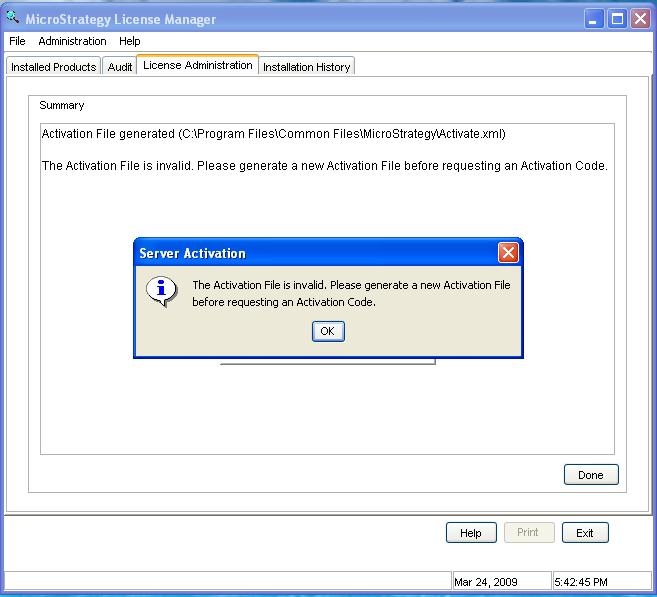
The Activation File is invalid. Please generate a new Activation File before requesting an Activation Code.
CAUSE:
The error can occur when the mstr.hist file is either missing, invalid, or the user attempting to perform the activation does not have the correct permissions on the file.
The mstr.hist file is necessary for the Strategy Intelligence Server 9.x activation because it holds the history of the Strategy product installs, as well as the license updates.
ACTION:
In order to resolve the issue, first determine if the issue is caused because the file is missing, invalid, or simply does not have the necessary permissions. To do this first determine if the file exists by checking in the following default location:
Windows: C:\Program Files\Common Files\Strategy\
UNIX/Linux: <MSTR_LOG_PATH>
If the file exists, check to make sure the user performing the activation has both read and write permissions on the file. If the file exists and the permissions are set correctly, then the file has become invalid.
If the cause is due to file permissions not set correctly, work with the system administrator to ensure the permissions are updated. If the mstr.hist file was missing or invalid, a repair install will need to be performed. The repair install will repopulate the mstr.hist file, or create it if it was missing, with the installation information associated with the repair install. If the file was simply invalid, the original installation history will not be removed, a new entry will be appended to the file with the repair install details.
In a UNIX/Linux environment, since a repair install is not an option, a new installation will need to be performed in order to correctly recreate the mstr.hist file. In this case the original installation history will not be preserved.
Refer to the following Strategy Knowledge Base technical note for a related issue with Strategy License Manager 9:
KB15708 - 'History file does not exist' error occurs when clicking on the 'Installation History' tab in Strategy License Manager 9.x and later.
KB411623
