Symptom:
In Web, the "filter on" option returns different attribute elements from an Intelligent Cube Report and a Regular Report. In the Cube Report, the filter on option returns attribute elements that will return no data. In the Regular Report, only attribute elements that will return results are available.
Steps to Reproduce:
1. Create an Intelligent cube with Year, Quarter, and Revenue with Strategy Tutorial data. Publish the cube.
2. Create a report based on the Intelligent Cube with Year, Quarter, and Revenue.
3. Create a report not based on the Intelligent Cube with Year, Quarter, and Revenue .
4. Create an attribute element prompt for the Year attribute.
5. Apply the year prompt to to view filter of the intelligent cube report and the report filter regular report.
6. In web, run the non intelligent cube and select 2008 in the prompt for the year.
7. The report will return data for year 2008. Right click the year attribute on the report and select "Filter on", only 2008 will be available to filter on.


8. In web, run the report based on the intelligent cube and select 2008 in the prompt for year.
9. This will also return only data for 2008. Right click the year attribute and select filter on. The options for 2008, 2009, and 2010 will be available.
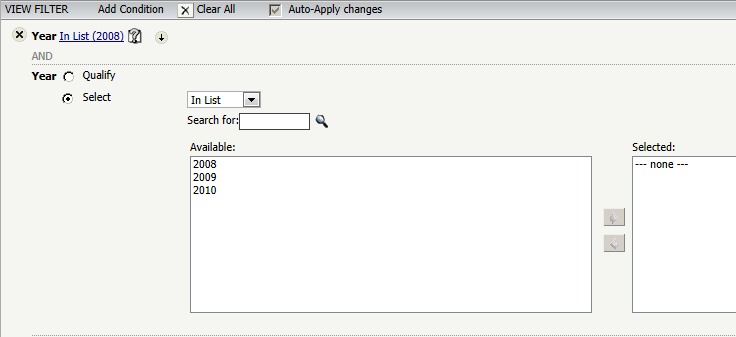
10. Choosing 2009 returns no data in the report.

Cause:
The filter on option is working by design. In the regular report, the prompt is treated as a report filter and only the data for 2008 is returned in the SQL. The filter on option adds a view filter to the report but since only data for 2008 has returned, that is the only attribute element in filter on. In the intelligent cube report, the prompt is treated as a view filter and the data for all of the years are returned in the SQL. Only data for the year 2008 is displayed in the report. Since data for all of the years is returned, they are all available in filter on. The filter on adds another view filter when there is already a view filter for 2008. For Example, if 2009 is selected in the filter on, there will be a view filter for 2008 and a view filter for 2009 which returns no data in the report.
Action:
There is an existing enhancement request to not show attribute elements in the "filter on" option that return no data or to make the options return data by adjusting the view filter. Contact Strategy Technical Support for an update on this enhancement request.
