EducationSoftwareStrategy.com
StrategyCommunity

Knowledge Base

Product

Community

Knowledge Base

TopicsBrowse ArticlesDeveloper Zone

Product

Download SoftwareProduct DocumentationSecurity Hub

Education

Tutorial VideosSolution GalleryEducation courses

Community

GuidelinesGrandmastersEvents
x_social-icon_white.svglinkedin_social-icon_white.svg
Strategy logoCommunity

© Strategy Inc. All Rights Reserved.

LegalTerms of UsePrivacy Policy
  1. Home
  2. Topics

KB41269: "Invalid list separator (or not supported) - check the current Regional Setting" error appears when running an outline that contains list separators, in MicroStrategy Command Manager 9.x and 10.x.


Community Admin

• Strategy


"Invalid list separator (or not supported) - check the current Regional Setting" error appears when running an outline that contains list separators, in MicroStrategy Command Manager 9.x and 10.x.

SYMPTOM:
 
When running an outline in Strategy Command Manager 9.x and 10.x that contains list separators, the following error appears:

 

ka04W000000OhLBQA0_0EM4400000029in.png

 
Sample Code/Error
Invalid separator (or not supported) - check the current Regional Setting
 
 
STEPS TO REPRODUCE
 
These are the steps to reproduce the issue in Strategy Tutorial:
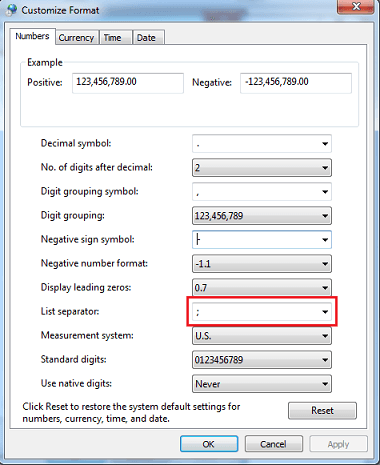
 

  • Change the list separator included in the Operating System's Regional Settings to semicolon, as shown below.  Language can be set to English US:
     
ka04W000000OhLBQA0_0EM4400000029iY.png
  • In Strategy Desktop, create a filter.
  • Open Strategy Command Manager and log into Strategy Tutorial.
  • Run the following command to modify the filter definition (the list separator used in the ApplyComparison function is the same as the one indicated in the Regional Settings)
     
     
    ALTER FILTER "Filter1" IN "\Public Objects\Filters" EXPRESSION "ApplyComparison (^"#0 = 130^"; @)" ON PROJECT "Strategy Tutorial";


CAUSE:
 
This is a known issue in Strategy Command Manager 9.x and 10.x.
 
ACTION:
Strategy will continue to investigate and post updates as soon as they are available.
 
 
WORKAROUND:
 
There are two possible workarounds:
 

  1. Change the list separator to comma when needed in Strategy Command Manager.
  2. Modify the filter through Strategy Desktop. The list separator is the one set in the OS Regional Settings.


Comment

0 comments

Details

Knowledge Article

Published:

May 25, 2017

Last Updated:

May 25, 2017