EducationSoftwareStrategy.com
StrategyCommunity

Knowledge Base

Product

Community

Knowledge Base

TopicsBrowse ArticlesDeveloper Zone

Product

Download SoftwareProduct DocumentationSecurity Hub

Education

Tutorial VideosSolution GalleryEducation courses

Community

GuidelinesGrandmastersEvents
x_social-icon_white.svglinkedin_social-icon_white.svg
Strategy logoCommunity

© Strategy Inc. All Rights Reserved.

LegalTerms of UsePrivacy Policy
  1. Home
  2. Topics

KB41270: MicroStrategy Developer Preferences options are expanded so big that some options are being cutoff.


Stefan Zepeda

Salesforce Solutions Architect • Strategy


This article describes potential root cause that MicroStrategy Developer Preferences options are expanded so big that some options are being cut off.

SYMPTOM:
Strategy Developer Preferences options are expanded so big that some options are being cut off.
 
Normal Version
 

ka02R000000kbgRQAQ_0EM440000002HNq.jpeg

 
Cutoff version (you can see the user is unable to click the "display hidden objects" option.
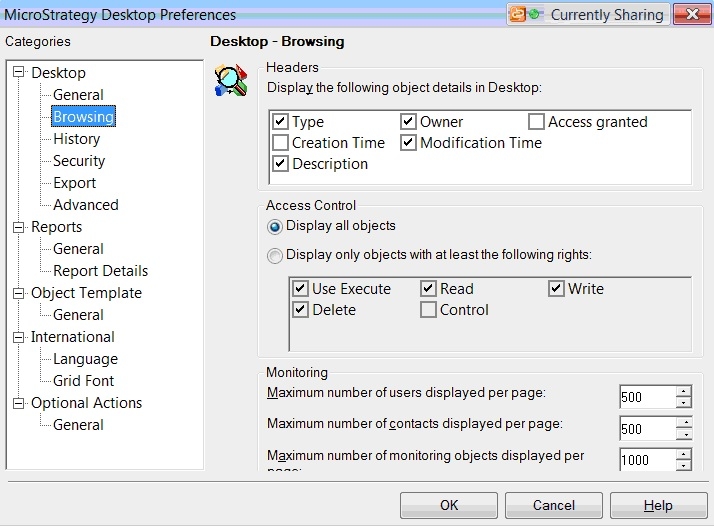
 

ka02R000000kbgRQAQ_0EM440000002HNk.jpeg

Users are unable to expand the box
 
CAUSE:
This is not a Strategy Issue. This is something that has to be changed on the computer itself. Two options may solve this issue.
 
ACTION:
Please be aware that changing these options may affect other programs on your computer.
 
1. Please change the screen resolution of your computer screen.
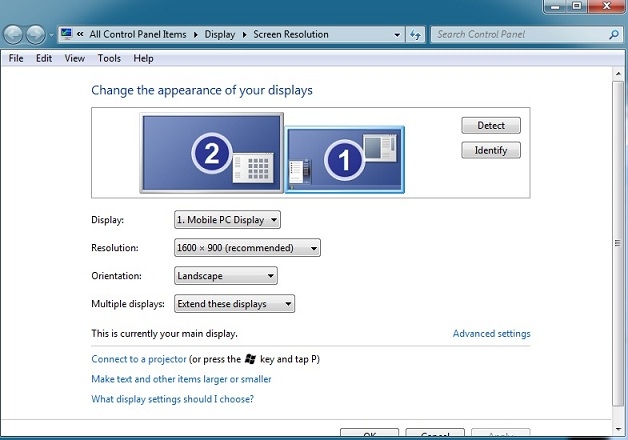
 

ka02R000000kbgRQAQ_0EM440000002HNh.jpeg


and/or
 
 
2. Please change the text display size
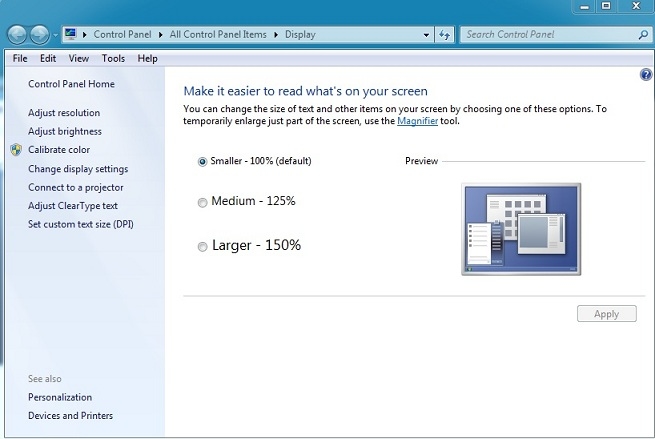


ka02R000000kbgRQAQ_0EM440000002HNm.jpeg


Comment

0 comments

Details

Knowledge Article

Published:

June 12, 2017

Last Updated:

June 12, 2017