SYMPTOM:
When running an audit using Strategy License Manager 10.x, the administrator sees that a user (in this example, TestUser) has Administrator privileges assigned to him inherited from the Power Users security role, as shown below:

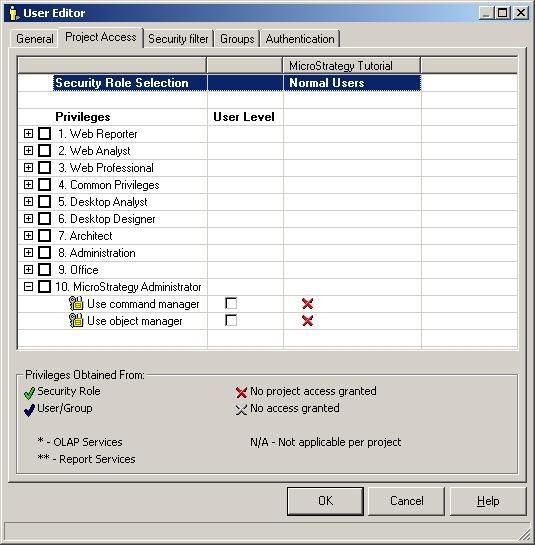
However, when logging into a 3-tier project source and viewing TestUser in the User Editor, the User Editor shows no Administrator licenses are being given to the user for the project, as shown below:
CAUSE:
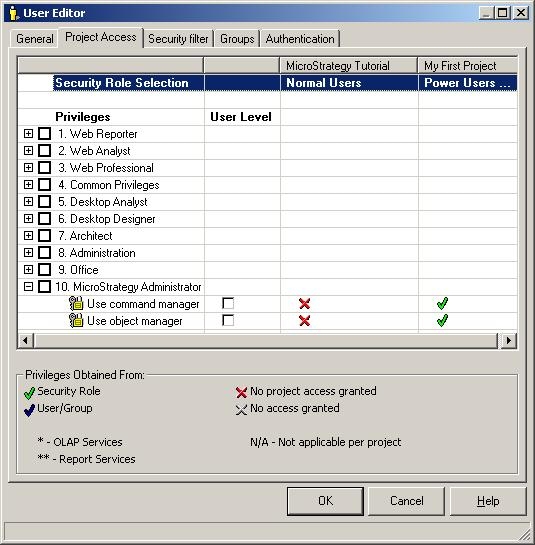
When looking at a user's privileges through the User Editor with a 3-tier project source, only those projects registered on the MicroStratregy Intelligence Server 10.x will appear as projects that the user has access to.
However, when connecting via a 2-tier project source and looking at the TestUser in the User Editor, a missing project (in this example, My First Project) that was not loaded on the Strategy Intelligence Server 10.x appears, as shown below:
ACTION:
When assigning privileges to users, if possible, use a 2-tier project source to connect to the metadata so that all projects in the metadata will appear. If a 3-tier connection must be used, then check the Strategy Intelligence Server Configuration to confirm if projects to which users may have privileges assigned are not registered on Strategy Intelligence Server 10.x.
KB412793
