EducationSoftwareStrategy.com
StrategyCommunity

Knowledge Base

Product

Community

Knowledge Base

TopicsBrowse ArticlesDeveloper Zone

Product

Download SoftwareProduct DocumentationSecurity Hub

Education

Tutorial VideosSolution GalleryEducation courses

Community

GuidelinesGrandmastersEvents
x_social-icon_white.svglinkedin_social-icon_white.svg
Strategy logoCommunity

© Strategy Inc. All Rights Reserved.

LegalTerms of UsePrivacy Policy
  1. Home
  2. Topics

KB412873: License Manager indicates a user name under one or more privileges but the User Editor shows no privileges assigned to the same user in MicroStrategy Developer


Community Admin

• Strategy


SYMPTOM:
Administrators experience inconsistent License Manager results when they notice that some user names are listed as a licensee while the User Editor shows no privileges or security role assigned to the same user under any of the projects.
 
Consider a "Test User," as shown below, who must be removed in order to bring the Strategy system in compliance with the signed license agreement:
 

ka04W000000uGBKQA2_0EM440000002Bjj.jpeg

 
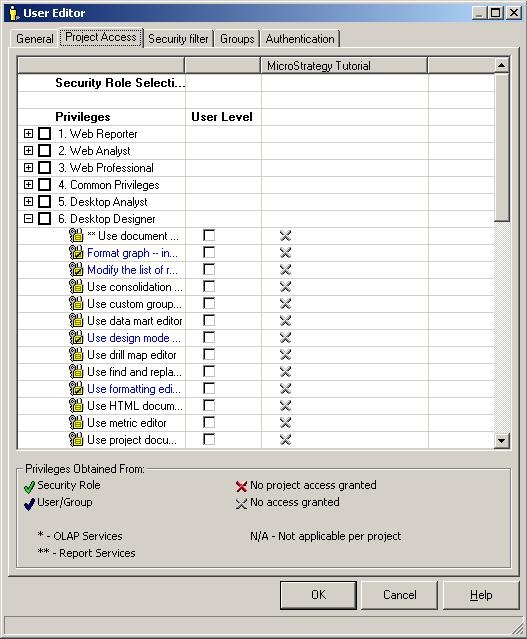
The administrator selects the 'Project Access' tab in the User Editor in order to remove all of the Desktop Designer privileges from the user. However, it is observed that all of the privileges under all of the projects are already denied, as shown below:
 

ka04W000000uGBKQA2_0EM440000002Bji.jpeg

 
CAUSE:
This issue occurs because there is an unregistered or unloaded project to which the user still has access.
 
ACTION:
To resolve this issue, perform the following steps:
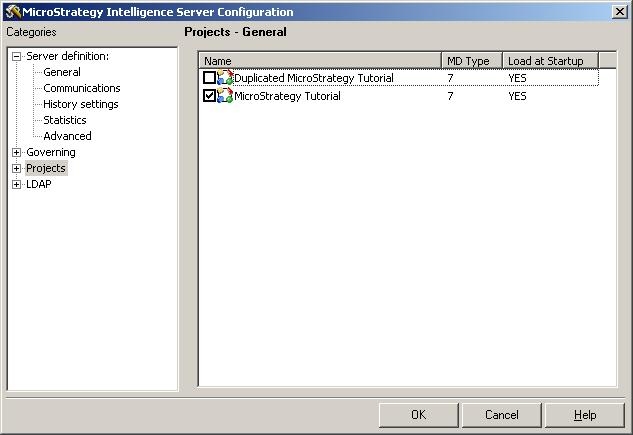
  • Go to Administrator > Project Monitor to see if there are any Unloaded Projects. If there are unloaded projects, then Load the project and go to Step 4.
  • If all of the available projects are loaded in the Project Monitor, go to the Projects section under the Strategy Intelligence Server Configuration and check which projects are not registered or are unloaded, as shown below:

ka04W000000uGBKQA2_0EM440000002BjU.jpeg
  • Check the box to the left of the un-registered project(s) so it becomes registered in the Server Definition and is loaded.
  • Go back to the User editor > 'Project Access' tab and remove the user privileges assigned to the project, as shown below:

ka04W000000uGBKQA2_0EM440000002BjV.jpeg
  • Go back to the License Manager to confirm that the user name is no longer listed as a licensee. Once this is confirmed, the project can be un-registered and unloaded.


KB412873


Comment

0 comments

Details

Knowledge Article

Published:

June 9, 2017

Last Updated:

December 31, 2018