SYMPTOM:
In Strategy Web 9.x, when a metric that needs to be used as a metric slider selector for a grid is defined as Min(Date) where Date is an attribute, the selector, will not display as a metric slider, but instead change automatically to metric qualification selector in HTML mode.
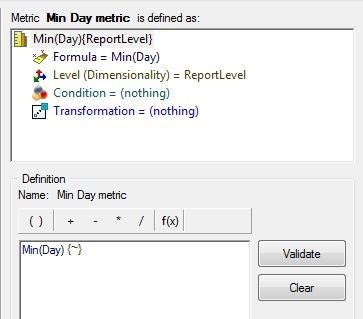
1. In Strategy Desktop, in the Tutorial Project create a metric defined as Min(Day) (Report Level) and name
it ‘Min Date’ (use a formula and select the Attribute Day)
2. Create a report with ‘Region’ and ‘Call Center’ attributes and ‘Min Date’ metric
3. In Strategy Web create a blank dashboard with previously created report as dataset.
4. In the dashboard body place a grid and add ‘Region’, ‘Call Center’ and ‘Min Date’
5. Add a metric slider selector targeting previously created grid with ‘Min Date’ metric as source

6. Go to express mode. The selector changed automatically to metric qualification selector and the dashboard
looks like as follow

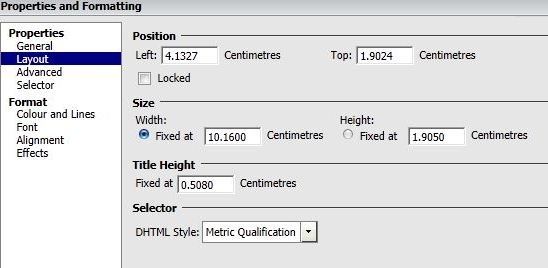
7. Go to editable mode and see selector properties. In layout section DHTML style has changed to metric
qualification
CAUSE:
The behavior is by design. When the data type of metrics is non-numeric like text or date and the metric slider qualification type is value, in DHTML it is automatically converted to qualification and only Null and Not Null are available in the operator list ; in Flash the metric slider is disabled.
