EducationSoftwareStrategy.com
StrategyCommunity

Knowledge Base

Product

Community

Knowledge Base

TopicsBrowse ArticlesDeveloper Zone

Product

Download SoftwareProduct DocumentationSecurity Hub

Education

Tutorial VideosSolution GalleryEducation courses

Community

GuidelinesGrandmastersEvents
x_social-icon_white.svglinkedin_social-icon_white.svg
Strategy logoCommunity

© Strategy Inc. All Rights Reserved.

LegalTerms of UsePrivacy Policy
  1. Home
  2. Topics

KB41294: "Error in report results (The object with the given identifier is not an object of the expected type.)" error message appears when accessing a link to a shortcut object in MicroStrategy Web 9.x .


Community Admin

• Strategy


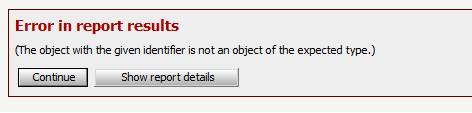
When users try to access a link to a shortcut object in MicroStrategy Web 9.x, the following error message is generated: Error in report results (The object with the given identifier is not an object of the expected type.)
SYMPTOM:
When users try to access a link to a shortcut object in Strategy Web 9.x, the following error message is generated:


Error in report results (The object with the given identifier is not an object of the expected type.)


ka04W000000OhCPQA0_0EM4400000026zt.png

 
The following entry can be found in DSSErrors.log:


The object with the given identifier is not an object of the expected type.

 
STEPS TO REPRODUCE:
 
1.  In Strategy Web right click on a shortcut object and choose "Show link": notice that GUID of the target object will appear in the link.
2. Replace GUID of the target object with GUID of the shortcut object in the URL.
3. When accessing the modified URL, the following error message is generated:

Error in report results (The object with the given identifier is not an object of the expected type.)

 
CAUSE:
 
This behaviour is related to the fact that in the URL GUID of the shortcut object is used intead of GUID of the target object.  It is not possible to build a URL to a shortcut object without referencing the target object in Strategy Web 9.x .
 
ACTION:
 
Replace GUID of the shortcut object with GUID of the target object in the URL.


Comment

0 comments

Details

Knowledge Article

Published:

May 31, 2017

Last Updated:

May 31, 2017