EducationSoftwareStrategy.com
StrategyCommunity

Knowledge Base

Product

Community

Knowledge Base

TopicsBrowse ArticlesDeveloper Zone

Product

Download SoftwareProduct DocumentationSecurity Hub

Education

Tutorial VideosSolution GalleryEducation courses

Community

GuidelinesGrandmastersEvents
x_social-icon_white.svglinkedin_social-icon_white.svg
Strategy logoCommunity

© Strategy Inc. All Rights Reserved.

LegalTerms of UsePrivacy Policy
  1. Home
  2. Topics

KB41302: "[ODBC Excel Driver] '(unknown)' is not a valid path." error message appears when reading the warehouse catalog in MicroStrategy Desktop 9.2.x against and Excel datasource.


Community Admin

• Strategy


This article describes an issue that may occur when an Excel file is mapped to a network drive.

SYMPTOM:
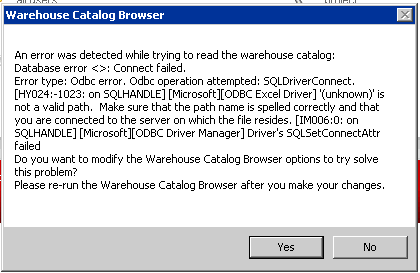
Whenever reading the warehouse catalog in Strategy Developer 9.4.x-10.x, users receive the error below:
 

ka04W000000OhWdQAK_0EM440000002D77.png


'(unknown)' is not a valid path.  Make sure that the path name is spelled correctly and that you are connected to the server on which the file resides.

 
NOTE:  This error is seen whenever the Excel file is mapped to a network drive.
 
CAUSE:
This particular instance was caused due to the network path where the file resides not being fully defined in the DSN.  The entire path to the file is needed in order for the location of the file to be found.
 
ACTION: 

  1. Go to the ODBC Administrator
  2. Configure the Excel DSN that is being used
  3. Manually enter in the full file path of the directory or NAS (Network Attached Storage) directory where the database name is requested 

WORKAROUND:
There have been instances where customers could not modify this through the ODBC Administrator.  In those cases this can be accomplished manually within the registry editor.

  1. Within the registry editor navigate to  HKey_Local_Machine\software\Wow6432Node\odbc\odbc.ini\<DSN Name>
  2. Modify the DefaultDir and DBQ fields with the full file path

 
Registry Modification:
Modifying registry values incorrectly may cause serious, system-wide problems that may require the re-installation of Microsoft Windows. Any edit of the registry is done at the user's own risk. Since these are user-initiated changes, they are not covered by any Strategy warranty. If using Microsoft Windows, the user should backup the registry and/or update an Emergency Repair Disk (ERD) prior to alterations.


Comment

0 comments

Details

Knowledge Article

Published:

May 17, 2017

Last Updated:

May 17, 2017