EducationSoftwareStrategy.com
StrategyCommunity

Knowledge Base

Product

Community

Knowledge Base

TopicsBrowse ArticlesDeveloper Zone

Product

Download SoftwareProduct DocumentationSecurity Hub

Education

Tutorial VideosSolution GalleryEducation courses

Community

GuidelinesGrandmastersEvents
x_social-icon_white.svglinkedin_social-icon_white.svg
Strategy logoCommunity

© Strategy Inc. All Rights Reserved.

LegalTerms of UsePrivacy Policy
  1. Home
  2. Topics

KB41312: "Mail Delivery Failed: message size exceeds fixed maximum size ##" error received in a failure notification email when an email subscription is sent with MicroStrategy Distribution Services 9.x and 10.x


Community Admin

• Strategy


"Mail Delivery Failed: message size exceeds fixed maximum size ##" error received in a failure notification email when an email subscription is sent with MicroStrategy Distribution Services 9.x and 10.x

SYMPTOM:
Whenever a Distribution Services email subscription is sent a failure notification email is received indicating "Mail Delivery Failed : message size exceeds fixed maximum size ##"
 
CAUSE:
This is an error message received from the mail server side rather than Strategy itself.  This is caused by the mail server having a fixed maximum in place which has been exceeded by the email created by Strategy.
 
ACTION:
This fixed maximum can be increased on the mail server by the exchange server administrators.
 
WORKAROUND:
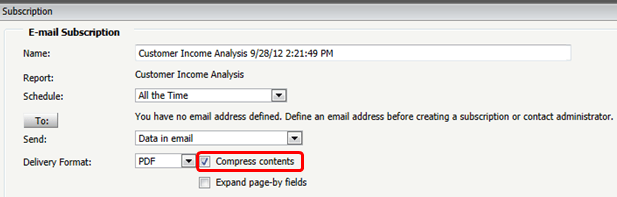
Depending on the size of the email, using the compress contents option whenever creating/modifying the email subscription can help alleviate the issue from occurring by decreasing the size of the email created.
 

ka04W000000ObKxQAK_0EM4400000029iV.png


Comment

0 comments

Details

Knowledge Article

Published:

June 5, 2017

Last Updated:

June 5, 2017