EducationSoftwareStrategy.com
StrategyCommunity

Knowledge Base

Product

Community

Knowledge Base

TopicsBrowse ArticlesDeveloper Zone

Product

Download SoftwareProduct DocumentationSecurity Hub

Education

Tutorial VideosSolution GalleryEducation courses

Community

GuidelinesGrandmastersEvents
x_social-icon_white.svglinkedin_social-icon_white.svg
Strategy logoCommunity

© Strategy Inc. All Rights Reserved.

LegalTerms of UsePrivacy Policy
  1. Home
  2. Topics

KB41315: When exporting a Report Services Document to Excel, all the formatting persists even when the export setting "Excel without formatting" is set in the preferences in MicroStrategy Web 10.x


Community Admin

• Strategy


In MicroStrategy Web 10.x, when users export a Report Services (RS) Document with grids to Excel, all of the formatting (color, font, etc.) persists even though the settings Export to grid setting in Preferences is set to 'Excel with Plain text', and Export HTML documents setting is set to 'Excel without formatting' are selected

SYMPTOM:
In Strategy Web 10.x, when users export a Report Services (RS) Document with grids to Excel, all of the formatting (color, font, etc.) persists even though the following settings are chosen in the preferences:
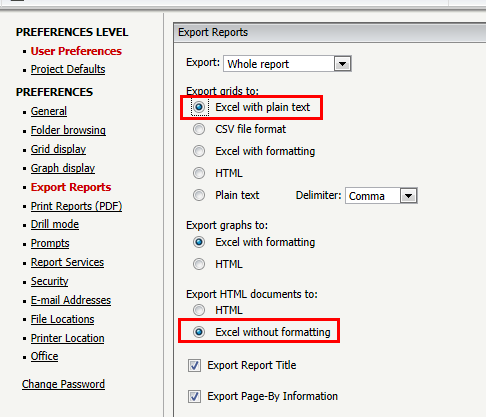
  • Export to grid setting in Preferences is set to 'Excel with Plain text', and
  • Export HTML documents setting is set to 'Excel without formatting'
ka04W000000ObiPQAS_0EM4400000026zY.png

But when exporting the report alone, it exports with plain text as expected: without any formatting.
CAUSE:
This is working as designed. The "Export Reports" preference section is only meant to affect reports and not RS Documents. The settings that refer to HTML documents are only meant to affect HTML documents, which is a different object type in the metadata than RS Documents.
WORKAROUND:
As a workaround, URL API can be used on a textbox in the same RS document to create an "export" link that performs the "Excel without formatting" function of the underlying grid. Follow the steps in tech note KB34692 for more information.


Comment

0 comments

Details

Knowledge Article

Published:

May 23, 2017

Last Updated:

May 23, 2017