EducationSoftwareStrategy.com
StrategyCommunity

Knowledge Base

Product

Community

Knowledge Base

TopicsBrowse ArticlesDeveloper Zone

Product

Download SoftwareProduct DocumentationSecurity Hub

Education

Tutorial VideosSolution GalleryEducation courses

Community

GuidelinesGrandmastersEvents
x_social-icon_white.svglinkedin_social-icon_white.svg
Strategy logoCommunity

© Strategy Inc. All Rights Reserved.

LegalTerms of UsePrivacy Policy
  1. Home
  2. Topics

KB41321: "Export this report automatically" option in MicroStrategy Developer 9.x or 10.x does not work when viewing a report from History List in MicroStrategy Web 9.x or 10.x


Stefan Zepeda

Salesforce Solutions Architect • Strategy


This article explains that the setting "Export this report automatically" In MicroStrategy Developer 9.x or 10.x is not meant to apply in Web and provides an equivalent solution for Web

SYMPTOM:
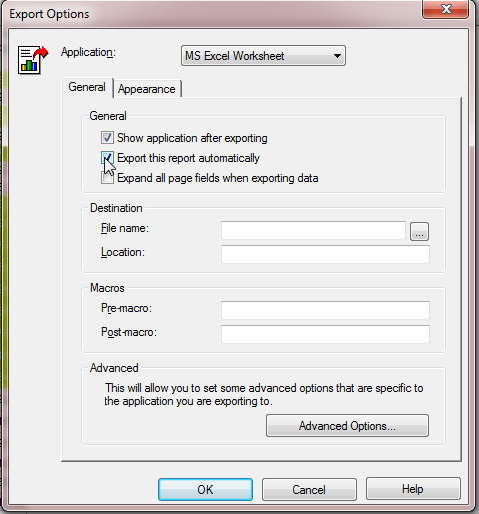
In Strategy Developer 9.x or 10.x, the setting "Export this report automatically" shown below has the following functionality (taken directly from the Strategy Developer Help):


If you send a report to your History List with this check box selected, and then read the report from your History List, the report is automatically exported to the application that you selected.
 

ka02R000000kbVCQAY_0EM4400000026zT.png

 
However, this setting does not carry over when viewing a report from the History List in Strategy Web 9.x or 10.x.
  
CAUSE:
This is working as designed. The "Export this report automatically" feature was only meant for Strategy Developer and not for Strategy Web.
 
ACTION:
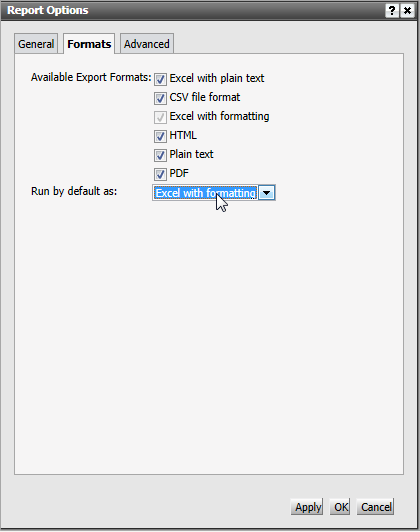
In the report execution page in Strategy Web, go to Tools > Report options > Formats > Run by default as: and select Excel, as shown below.
 

ka02R000000kbVCQAY_0EM4400000026zX.png


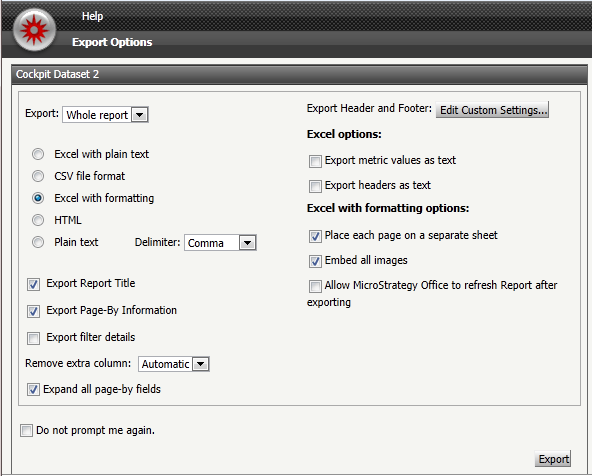
When a user opens a report, they will be prompted to export the report, as shown below.


ka02R000000kbVCQAY_0EM4400000026zV.png

 
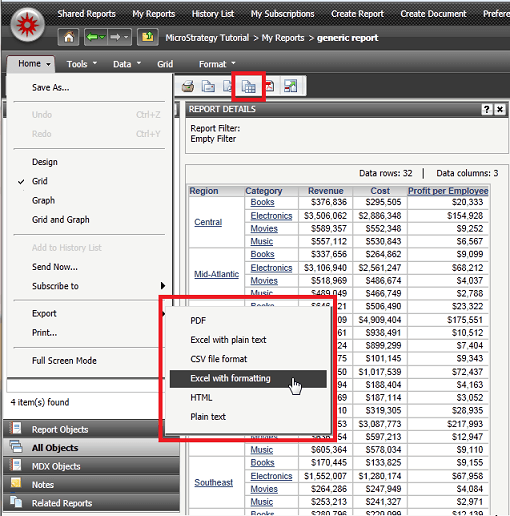
Note: Reports can also be exported after opening the report by selecting the Export button under the Home menu bar or navigating to Home > Export > Excel with formatting.
ka02R000000kbVCQAY_0EM4400000026zZ.png


Comment

0 comments

Details

Knowledge Article

Published:

June 16, 2017

Last Updated:

June 16, 2017