EducationSoftwareStrategy.com
StrategyCommunity

Knowledge Base

Product

Community

Knowledge Base

TopicsBrowse ArticlesDeveloper Zone

Product

Download SoftwareProduct DocumentationSecurity Hub

Education

Tutorial VideosSolution GalleryEducation courses

Community

GuidelinesGrandmastersEvents
x_social-icon_white.svglinkedin_social-icon_white.svg
Strategy logoCommunity

© Strategy Inc. All Rights Reserved.

LegalTerms of UsePrivacy Policy
  1. Home
  2. Topics

KB413590: “MDX Metrics are not from the same source table” error occurs when executes a normal report against two different SAP cubes from the same SAP source in MicroStrategy Desktop 9.x


Stefan Zepeda

Salesforce Solutions Architect • Strategy


“MDX Metrics are not from the same source table” error occurs when executes a normal report against two different SAP cubes from the same SAP source in MicroStrategy Desktop 9.x

SYMPTOM:
 
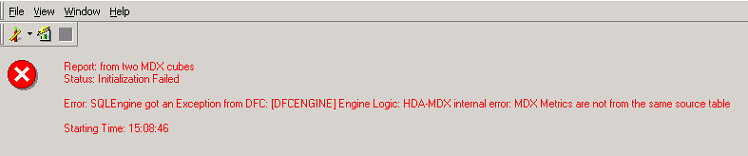
In Strategy Desktop 9.x, execute a normal report with metrics from two different SAP cubes, but same MDX source gets following error:
 

ka044000000kJLGAA2_0EM440000002C4U.png


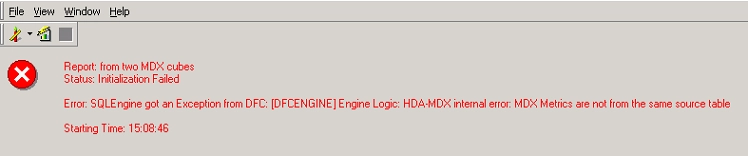
Error: SQLEngine got an Exception from DFC; Engine Logic: HDA-MDX internal error: MDX Metrics are not from the same source table.


REPRODUCING STEPS:
 
     1.    In Strategy Desktop 9.x, navigate to Tutorial project, and import two cubes from one SAP BW 7.x source. In this example, import two SAP cubes called ENG_BASIC and IE_SLS
 
     2.    Create a normal report, and add metrics from two SAP cubes as shown below:
 

ka044000000kJLGAA2_0EM440000002C4V.png

 
     3.    Execute the report gets following error:
 

ka044000000kJLGAA2_0EM440000002C4S.png

 
NOTE:
 

  • Create separate DB instance for the SAP cubes can’t workaround this error.
  • Two separate DB instances means connecting the cubes a 2nd time, creating all compound metrics a 2nd time, formatting all attributes and metrics a 2nd time, creating all mapped attributes a 2nd time. 
  • The query is seen twice.

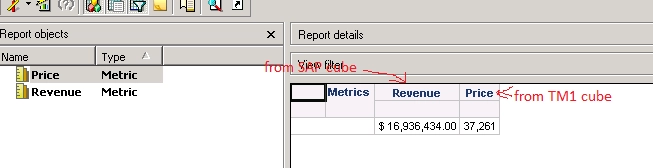
However, run reports with metrics that from two different MDX source (one from SAP, other one from TM1) could successfully get data as shown below:
 

ka044000000kJLGAA2_0EM440000002C4R.png


No attribute is included in the report since there is no relative SAP data on that level. Following is the SQL view:
 

ka044000000kJLGAA2_0EM440000002C4P.jpeg


CAUSE:
 
This is a known issue with Strategy Desktop 9.x
 
 
ACTION:
 
Please contact Strategy Technical Support for an update with this issue.
 
The Strategy Internal Reference Number for the issue discussed in this technical note is 513019.


KB38432 KB413590


Comment

0 comments

Details

Knowledge Article

Published:

June 8, 2017

Last Updated:

January 1, 2019