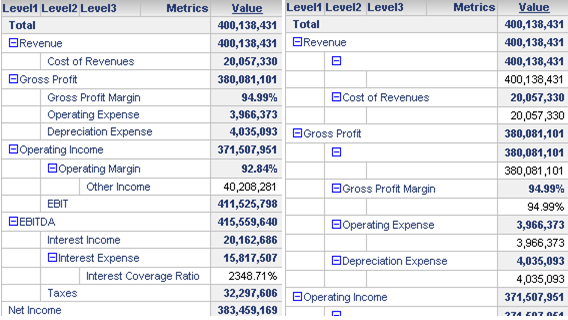
Starting from Strategy Web 9.3 a new setting “Hide NULL” has been introduced for outline mode. By default if an attribute has “NULL” the whole row will be hidden.
These rows can be visible or hidden as per the user preference. By default this behavior is to hide them.
The setting can be turned off as through web preference option in the sys_definition.xml located at <MSTR-Web root directory>/WEB-INF/xml/sys_definitions.xml. The setting name is 'hideEmptyNodesInOutlineMode'.
Set its value to '1' to enable hiding empty nodes while set the value to '0' to disable.
Example of XML file: <pr des="Hide Empty Nodes In Outline Mode" n="hideEmptyNodesInOutlineMode" scp="user_project" v="1" dt="boolean" />
Example of report display in outline mode : (Left: empty nodes hidden, Right: Not hidden)