SYMPTOM:
Users notice the Web Services URL cannot be modified in Strategy Office Options > Server > General.
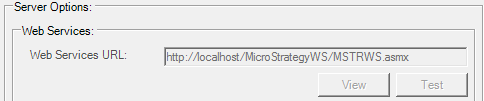
CAUSE:
One possible cause of this is that the key has been disabled in the moimain.dll.connfig file, found by default at 'C:\Users\\AppData\Roaming\Strategy\Office.
ACTION:
Find the following key in the moimain.dll.config and ensure the value for 'enable' is set to 1.
<add key="MozartAddIn.MSTRWebServices.mstrws" value="http://localhost/StrategyWS/MSTRWS.asmx" enable="1" override="0" />
