EducationSoftwareStrategy.com
StrategyCommunity

Knowledge Base

Product

Community

Knowledge Base

TopicsBrowse ArticlesDeveloper Zone

Product

Download SoftwareProduct DocumentationSecurity Hub

Education

Tutorial VideosSolution GalleryEducation courses

Community

GuidelinesGrandmastersEvents
x_social-icon_white.svglinkedin_social-icon_white.svg
Strategy logoCommunity

© Strategy Inc. All Rights Reserved.

LegalTerms of UsePrivacy Policy
  1. Home
  2. Topics

KB41400: How to change recycle interval for ASP Worker Process with IIS 7.0 on Windows 2008 or Windows 7


Community Admin

• Strategy


This knowledge base article describes how to disable or change the recycle interval for ASP Worker Process with IIS 7.0.

By default, Application Pool created for Strategy Web or Mobile Server has fixed intervals for process recycling. The steps below clarify where to find this setting.
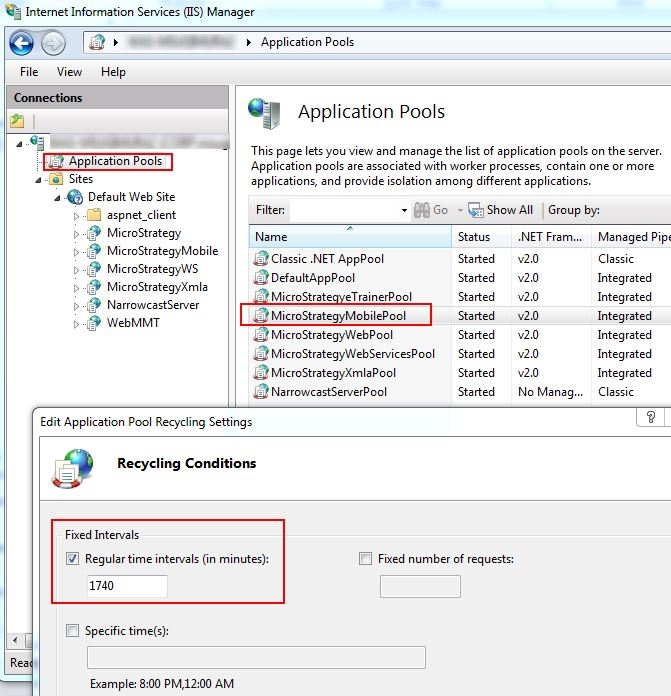
  • Open Internet Information Services (IIS) Manager.
  • Highligh "Application Pools," and find the one cread for the server. In this example, Application Pool for Mobile Server is used.
  • Right click on "StrategyMobilePool" and select "Recycling..."
  • Make changes in this window as needed.
ka04W000000OfjHQAS_0EM4400000026ya.jpeg

 
For more information, refer to:
http://technet.microsoft.com/en-us/library/cc770764(v=ws.10).aspx
 
For IIS 6.0, please see:

  • KB11776 - The ASP Worker Process systematically recycles itself in IIS 6.0 on Windows 2003 

Comment

0 comments

Details

Knowledge Article

Published:

June 13, 2017

Last Updated:

April 6, 2018