EducationSoftwareStrategy.com
StrategyCommunity

Knowledge Base

Product

Community

Knowledge Base

TopicsBrowse ArticlesDeveloper Zone

Product

Download SoftwareProduct DocumentationSecurity Hub

Education

Tutorial VideosSolution GalleryEducation courses

Community

GuidelinesGrandmastersEvents
x_social-icon_white.svglinkedin_social-icon_white.svg
Strategy logoCommunity

© Strategy Inc. All Rights Reserved.

LegalTerms of UsePrivacy Policy
  1. Home
  2. Topics

KB414031: Red number formatting does not display for attributes with negative values in MicroStrategy Web 9.x


Stefan Zepeda

Salesforce Solutions Architect • Strategy


Red number formatting does not display for attributes with negative values in MicroStrategy Web 9.x

SYMPTOM:
 
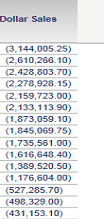
When applying any of the red number formatting to negative numbers for an attribute in a Report, the red formatting does not display in Strategy Web 9.x.
Note: The red number formatting also does not display for a Document in Strategy Developer and subsequently does not display in Strategy Web.
 
 
Report in Desktop:                               Report in Web:
 

ka02R000000kazjQAA_0EM440000002CM3.png


ka02R000000kazjQAA_0EM440000002CLq.png

 
STEPS TO REPRODUCE: 

  • In Strategy Developer, create a Dollar Sales attribute by selecting "QTR_CATEGORY_SLS" as the source table.
  • Select the "TOT_DOLLAR_SALES" column and multiply it by -1.
  • Validate and save the attribute.
  • Update schema.
  • Create a Report with the Dollar Sales attribute in the rows.
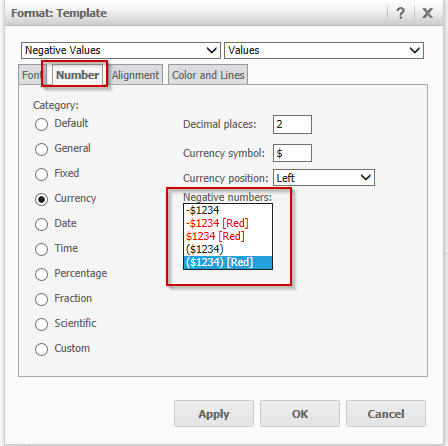
  • Under format, select number > Currency, and select any of the negative number in red, like shown below.
ka02R000000kazjQAA_0EM440000002CM1.png
  • Save and Run the Report.
  • Run the Report in Strategy Web 9.x and compare to the results from Strategy Desktop.

 
CAUSE:
 
This is a known issue in Strategy Web 9.x.
 
ACTION:
 
This issue has been fixed in Strategy 10.11, upgrade to this version to take advantage of the fix.
 
WORKAROUND:
 
Create a metric based off of the attribute and apply thresholds for the negative values to the metric instead.
 
KB414031


Comment

0 comments

Details

Knowledge Article

Published:

June 8, 2017

Last Updated:

January 9, 2019