EducationSoftwareStrategy.com
StrategyCommunity

Knowledge Base

Product

Community

Knowledge Base

TopicsBrowse ArticlesDeveloper Zone

Product

Download SoftwareProduct DocumentationSecurity Hub

Education

Tutorial VideosSolution GalleryEducation courses

Community

GuidelinesGrandmastersEvents
x_social-icon_white.svglinkedin_social-icon_white.svg
Strategy logoCommunity

© Strategy Inc. All Rights Reserved.

LegalTerms of UsePrivacy Policy
  1. Home
  2. Topics

KB41414: "All objects" option is not available for some reports with MicroStrategy Web 9.x


Stefan Zepeda

Salesforce Solutions Architect • Strategy


"All objects" option is not available for some reports with MicroStrategy Web 9.x

SYMPTOM:
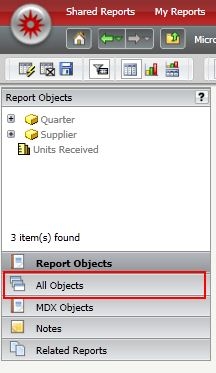
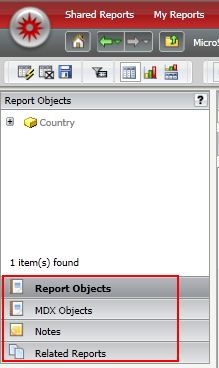
Users might notice that the "All Objects" window is not available for some reports even though no customization is used in Strategy Web 9.x.
 

ka02R000000kY16QAE_0EM440000002D6Y.jpeg

Sample Code/Error
Report with "All Objects" window
 

ka02R000000kY16QAE_0EM440000002D6c.jpeg

Sample Code/Error
Report without "All Objects" option
 
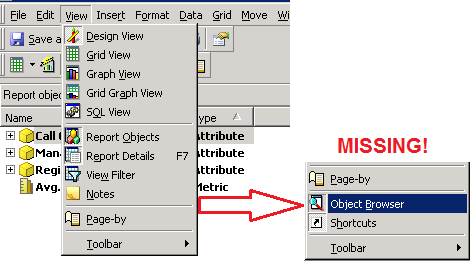
The same behavior might be seen for the report in Strategy Desktop 9.x:
 

ka02R000000kY16QAE_0EM440000002D6W.png


CAUSE:
The "All Objects" option is not available for the following types of reports:

  • Freeform SQL Reports
  • Query Builder Reports
  • Report created with Intelligent Cube
  • MDX Reports

Hence if the report is one of the above types, the "All Objects" or "Object Browser" options will not show up in Strategy Web 9.x and Strategy Desktop 9.x respectively.
 
ACTION:
No action is necessary.


Comment

0 comments

Details

Knowledge Article

Published:

June 12, 2017

Last Updated:

June 12, 2017