EducationSoftwareStrategy.com
StrategyCommunity

Knowledge Base

Product

Community

Knowledge Base

TopicsBrowse ArticlesDeveloper Zone

Product

Download SoftwareProduct DocumentationSecurity Hub

Education

Tutorial VideosSolution GalleryEducation courses

Community

GuidelinesGrandmastersEvents
x_social-icon_white.svglinkedin_social-icon_white.svg
Strategy logoCommunity

© Strategy Inc. All Rights Reserved.

LegalTerms of UsePrivacy Policy
  1. Home
  2. Topics

KB41416: In MicroStrategy 9.4.1 - 10.x, when submitting a modification after editing a flag and a metric in different rows of a Transaction Services document, the flag is updated for both records


Community Admin

• Strategy


This article describes an issue hen submitting a modification after editing a flag and a metric in different rows of a Transaction Services document, the flag is updated for both records

SYMPTOM:
When submitting a modification after editing a flag and a metric in different rows of a Transaction Services document, users may note that the flag is updated for both records.
 
STEPS TO REPRODUCE:
It is possible to replicate this behaviour in the 9.2.1m Tutorial project according to the following steps:

  • In the "TUTORIAL_DATA_7200.mdb" database, add a column to the table "ORDER_DETAIL" called "FLAG", defined as text with length 1
  • Set the "FLAG" value to "N" for the customer IDs 9102, 2176, 1540
  • Update the structure for the table "ORDER_DETAIL", update the schema and then create an attribute for the new column "FLAG"
  • Create a report called “Report Base” with the attributes "Day", "Customer", "Item", "Flag" and the metric "Unit Cost". Insert a filter on Day@ID = 01/01/2008 and a filter on Customer@ID in (9102, 2176, 1540):
     
ka04W000000OagCQAS_0EM440000002D6E.jpeg
  • Create a transaction report named “Rep_Transaction”, with the following SQL:
     
ka04W000000OagCQAS_0EM440000002D6D.jpeg
  •   

    Sample Code/Error
    UPDATE ORDER_DETAIL
    SET UNIT_COST=
    ,          FLAG=
    where CUSTOMER_ID =
    AND         ITEM_ID =
    and ORDER_DATE =


  • Create a dashboard document using the “Report Base” as a dataset and, from Strategy Web, configure a Transaction using the report “Rep_Transaction”
  • Map the input objects and select only "Flag@ID" and "Unit Cost" as editable text fields:
     
ka04W000000OagCQAS_0EM440000002D6J.jpeg
  • Insert a transaction button with a “Submit” action to save the data 
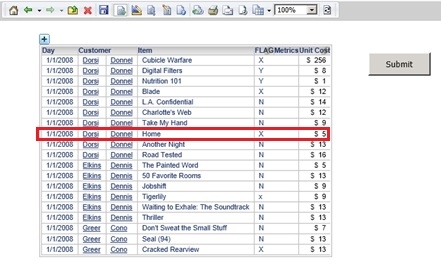
  • Execute the dashboard in Express mode and modify only the "Unit Cost" on the eighth row and only the "FLAG" on the final row, before selecting the "Submit" button:
     
ka04W000000OagCQAS_0EM440000002D6C.jpeg
  • After submitting the modifications , it may be noted that, not only has the "Unit Cost" column been updated for the eighth row of data, but also the entry pertaining to "FLAG":


ka04W000000OagCQAS_0EM440000002D6H.jpeg

CAUSE:
The column added to the "ORDER_DETAIL" table contains only 1 letter to define its value.  This column is referenced subsequently as the "ID" form of a new attribute.  Since the column contains only 2 distinct values, "Y" and "N", Strategy considers it to have only 2 unique elements.  When the attribute is added to a grid within a Transaction Services document and modifications are made to the metric and "FLAG" columns, even though the value has been changed to X only for only one of the two rows, the "FLAG" is updated for both of those modified.  If the "Automatically recalculate values after data change" is selected, all rows in the grid will have the "FLAG" updated to "X":


ka04W000000OagCQAS_0EM440000002D6I.jpeg

 
ACTION:
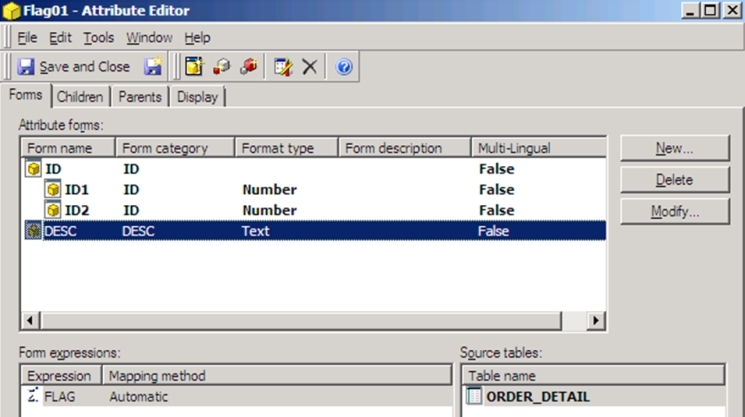
When seeking to identify uniquely each row of the "ORDER_DETAIL" table for an element of the "FLAG" attribute, users may note that every entry is defined by two values, the "ORDER_ID" and "ITEM_ID" columns.  On that basis, it is necessary to create an attribute with 2 columns as ID form and the "Flag" column as the "DESC" form:
 

ka04W000000OagCQAS_0EM440000002D6B.jpeg

 
This can then be mapped to the input for the Transaction Service, to ensure that only specific rows are updated.


KB41416


Comment

0 comments

Details

Knowledge Article

Published:

June 9, 2017

Last Updated:

December 30, 2018