EducationSoftwareStrategy.com
StrategyCommunity

Knowledge Base

Product

Community

Knowledge Base

TopicsBrowse ArticlesDeveloper Zone

Product

Download SoftwareProduct DocumentationSecurity Hub

Education

Tutorial VideosSolution GalleryEducation courses

Community

GuidelinesGrandmastersEvents
x_social-icon_white.svglinkedin_social-icon_white.svg
Strategy logoCommunity

© Strategy Inc. All Rights Reserved.

LegalTerms of UsePrivacy Policy
  1. Home
  2. Topics

KB414682: Metric values are double counted in a report with consolidations which contain attribute elements from different hierarchies in one expression in MicroStrategy Developer 9.4.x and 10.x


Stefan Zepeda

Salesforce Solutions Architect • Strategy


Metric values are double counted in a report with consolidations which contain attribute elements from different hierarchies in one expression in MicroStrategy Developer 9.4.x and 10.x

Metric values are double counted in a report with consolidations which contain attribute elements from different hierarchies in one expression in Strategy Developer 9.4.x and 10.x
 
The following steps demonstrate how to reproduce this issue in tutorial project:
 

  1. Create a consolidation with one element as shown below:
ka044000000kMugAAE_0EM440000002Cou.png


  • Create a report "R1" with Test_Con and Category in rows and Cost in columns as shown below:
ka044000000kMugAAE_0EM440000002Cp8.png


  • Create a report "R2" with Category in rows and Cost in columns. Insert filter "Year in list (2009) or Category in list (Electronics)" into the report as shown below:
ka044000000kMugAAE_0EM440000002Cp9.png


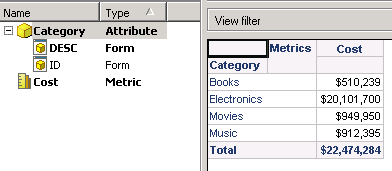
  • R2 shows different cost value for Electronics compared with R1 as shown below:
ka044000000kMugAAE_0EM440000002Cp7.png

 
Metric value for "Year=2009 and Category=Electronics" has been double counted in R1.
 
CAUSE:
 
This is by design. SQL Engine will generate separate SQL pass for each attribute element from different hierarchies in the consolidation expression in R1 as shown below:


select a11. AS YEAR_ID,
a11. AS CATEGORY_ID,
a12. AS CATEGORY_DESC0,
a11. AS WJXBFS1
from a11,
a12
where a11. = a12.
and a11. = 2009
 
select a11. AS CATEGORY_ID,
max(a12.) AS CATEGORY_DESC0,
sum(a11.) AS WJXBFS1
from a11,
a12
where a11. = a12.
and a11. = 2
group by a11.


The first pass will calculate metric values when Year=2009 while the second will calculate values when Category=Electronics. Then, Analytical Engine will perform arithmetical operator "+" to sum values from the two passes and get metric value for the consolidation element. This will make data for "Year=2009 and Category=Electronics" double counted.


However, SQL Engine only generates one SQL pass for R2 as shown below:


select a11. AS CATEGORY_ID,
max(a12.) AS CATEGORY_DESC0,
sum(a11.) AS WJXBFS1
from a11,
a12
where a11. = a12.
and (a11. in (2009)
or a11. in (2))
group by a11.


The logical operator "or" in qualification "a11. in (2009) or a11. in (2))" will make data for "Year=2009 and Category=Electronics" counted only once.
  
WORKAROUND:
 
Please use filters instead of consolidations to prevent double counting issue.
KB414682


Comment

0 comments

Details

Knowledge Article

Published:

April 17, 2017

Last Updated:

January 1, 2019