EducationSoftwareStrategy.com
StrategyCommunity

Knowledge Base

Product

Community

Knowledge Base

TopicsBrowse ArticlesDeveloper Zone

Product

Download SoftwareProduct DocumentationSecurity Hub

Education

Tutorial VideosSolution GalleryEducation courses

Community

GuidelinesGrandmastersEvents
x_social-icon_white.svglinkedin_social-icon_white.svg
Strategy logoCommunity

© Strategy Inc. All Rights Reserved.

LegalTerms of UsePrivacy Policy
  1. Home
  2. Topics

KB41474: New Features in MicroStrategy Command Manager 9.x


Community Admin

• Strategy


There are 8 new features added in MicroStrategy Command Manager 9.x. The following list describes each of them。

There are 8 new features added in Strategy Command Manager 9.3.0.  The following list describes each of them:
 

    • Subscriptions and prompts: Prompts and prompt answers can be included directly within subscriptions while creating subscriptions of any type. Example:

      Sample Code/Error
      
      CREATE HISTORYLISTSUBSCRIPTION SCHEDULE "Books Closed " USER "administrator" CONTENT "cm" IN FOLDER "\Public Objects\Reports" IN PROJECT "Strategy Tutorial" PROMPT "Elements of Category" ANSWER "8D679D3711D3E4981000E787EC6DE8A4:1";


      Note: 8D679D3711D3E4981000E787EC6DE8A4 is the object ID and 1 is the ID form value.
       
    • Configuring Strategy Web preferences: Added support for configuring Strategy Web preferences for any user at all applicable object levels. Example:

      Sample Code/Error
      
      APPLY WEBPREFERENCES DEFAULTVALUES FOR USER "baoter" TO PROJECT "Strategy tutorial";


    • Undo package support: Package management now supports undo package creation and deployment. Example:
      Sample Code/Error

      
      CREATE UNDOPACKAGE "C:\UndoPackage.mmp" FROM PACKAGE "C:\MDDelta.mmp";


  • Log-only mode for import packages: Import package configurations support log-only mode while importing packages. Example:

    Sample Code/Error
    
    IMPORT PACKAGE "C:\MDDelta.mmp" FOR PROJECT "Strategy Tutorial" LOGONLY;


  • Project and Intelligence Server configurations: Additional project and Intelligence Server options and settings can be configured through Command Manager. Examples:

    Sample Code/Error

    
    ALTER PROJECT CONFIGURATION SHOWSTATUS TRUE IN PROJECT "Strategy Tutorial";

    
    ALTER SERVER CONFIGURATION MAXCONNECTIONTHREADS 5 BACKUPFREQ 0...


  • VLDB property and privilege updates: Updated VLDB property and privilege commands to support new options. Example:

    Sample Code/Error
    
    ALTER VLDBSETTING PROPERTYNAME "Evaluation ordering" PROPERTYVALUE "1" FOR TEMPLATE "TIME analysis" IN FOLDER "\Public Objects\Templates" IN PROJECT "Strategy tutorial";


  • Named shortcuts support: Added support for using named shortcuts in configurations. Example:

    Sample Code/Error
    
    CREATE SHORTCUT "Drill Maps1" IN FOLDER "\Public Objects" FOR FOLDER "Drill Maps" IN FOLDER "\Public Objects" FOR PROJECT "Strategy Tutorial";
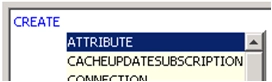

     
  • Script development tips: Auto-complete improvements were included to provide helpful hints for script development. Example:
ka04W000000ObK8QAK_0EM4400000029gR.png

For more information on the above outlines, make sure to consult the Strategy Command Manager application Help documentation.


Comment

0 comments

Details

Knowledge Article

Published:

June 5, 2017

Last Updated:

June 5, 2017