EducationSoftwareStrategy.com
StrategyCommunity

Knowledge Base

Product

Community

Knowledge Base

TopicsBrowse ArticlesDeveloper Zone

Product

Download SoftwareProduct DocumentationSecurity Hub

Education

Tutorial VideosSolution GalleryEducation courses

Community

GuidelinesGrandmastersEvents
x_social-icon_white.svglinkedin_social-icon_white.svg
Strategy logoCommunity

© Strategy Inc. All Rights Reserved.

LegalTerms of UsePrivacy Policy
  1. Home
  2. Topics

KB41499: The sheet name is changed to "recovered_sheet" when exporting a report with a colon character ":" in report name to Excel file in MicroStrategy Web 9.2.1m in Japanese environment


Community Admin

• Strategy


SYMPTOM:
 
In Strategy Web 9.2.1m, the sheet name is changed to "recovered_sheet" when exporting a report with a colon character ":" in report name to Excel file in Japanese environment, as shown below:
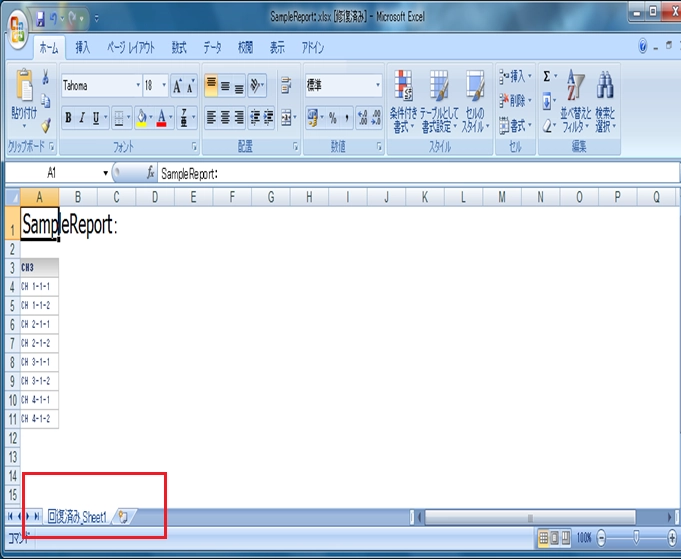
 

ka04W000000OfxdQAC_0EM4400000026yG.png

 
Sample Code/Error
"recovered_sheet"
 
 
STEPS TO REPRODUCE:
 
Follow the steps below to reproduce the issue with Strategy Tutorial project:

  1. In Strategy Web, create a report with any attribute in the row. Name the report with a colon character ":" in name, such as "Test:".
  2. Export the report created at step 1 to Excel file.
  3. Open the Excel file in Microsoft Office in Japanese environment, note that the sheet name is changed to "recovered_ sheet" instead of the original report name.

CAUSE:
 
This is an known issue with in Microsoft Excel in Japanese language setting.
 
 
ACTION:
 
Use English as Microsoft Office language setting.


Comment

0 comments

Details

Knowledge Article

Published:

July 17, 2017

Last Updated:

July 17, 2017