EducationSoftwareStrategy.com
StrategyCommunity

Knowledge Base

Product

Community

Knowledge Base

TopicsBrowse ArticlesDeveloper Zone

Product

Download SoftwareProduct DocumentationSecurity Hub

Education

Tutorial VideosSolution GalleryEducation courses

Community

GuidelinesGrandmastersEvents
x_social-icon_white.svglinkedin_social-icon_white.svg
Strategy logoCommunity

© Strategy Inc. All Rights Reserved.

LegalTerms of UsePrivacy Policy
  1. Home
  2. Topics

KB41501: How to configure MicroStrategy Certificate Server to authenticate against MicroStrategy Intelligence Server via NT Authentication


Community Admin

• Strategy


Follow the instructions below to configure MicroStrategy Certificate Server to authenticate against MicroStrategy Intelligence Server via NT Authentication.

Follow the instructions below to configure Strategy Certificate Server to authenticate against Strategy Intelligence Server via NT Authentication
1. Edit certificateServerConfig.xml and set the authentication mode to "2" as detailed below. This file is located under CertificateServer\WEB-INF\xml


<pr n="AuthMode" v="2" desc="The Intelligence Server authentication mode" />
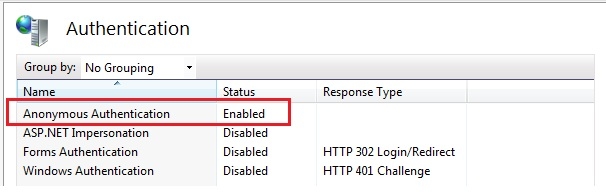
2. Also, make sure the anonymous authentication mode is enabled if Strategy Certificate Server is on IIS.

ka04W000000Of2vQAC_0EM440000002AER.jpeg

Comment

0 comments

Details

Knowledge Article

Published:

June 13, 2017

Last Updated:

June 13, 2017