EducationSoftwareStrategy.com
StrategyCommunity

Knowledge Base

Product

Community

Knowledge Base

TopicsBrowse ArticlesDeveloper Zone

Product

Download SoftwareProduct DocumentationSecurity Hub

Education

Tutorial VideosSolution GalleryEducation courses

Community

GuidelinesGrandmastersEvents
x_social-icon_white.svglinkedin_social-icon_white.svg
Strategy logoCommunity

© Strategy Inc. All Rights Reserved.

LegalTerms of UsePrivacy Policy
  1. Home
  2. Topics

KB41505: Zero height bar appears in graph when the Y axis starts at value that equals to the minimum value of the series in MicroStrategy Developer 9.x and 10.x


Stefan Zepeda

Salesforce Solutions Architect • Strategy


KB41505: Zero height bar appears in graph when the Y axis starts at value that equals to the minimum value of the series in MicroStrategy Developer 9.x and 10.x

 
SYMPTOM:
 
Zero height bar appears in graph when the Y axis starts at value that equals to the minimum value of the series with "Always Include Zero in this Scale" option unchecked in Strategy Developer 9.x and 10.x.
 
 
STEPS TO REPRODUCE:
  • In Strategy Desktop, create a report with attribute in row, metric in column, and attribute in page-by.
  • Run the report in Graph View, and select Vertical Bar: Clustered as Graph Type.
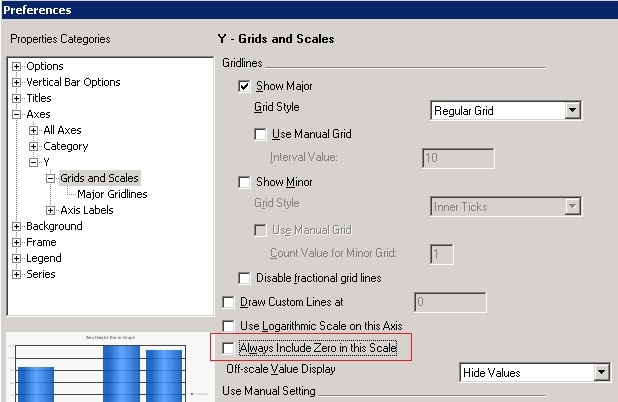
  • Go to Menu -> Graph -> Preferences, under Categories -> Axes -> Y -> Grids and Scales, uncheck "Always Include Zero in this Scale" option, as shown below:
ka02R000000kXHjQAM_0EM440000002D5c.jpeg
  • Click on OK to apply the change.
  • Select 1/17/2008 in page-by, Y axis starts at 30 that is same with minimum value of series and causes zero height bar, as shown below:
ka02R000000kXHjQAM_0EM440000002D5g.jpeg
  •  
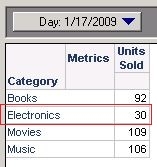
    NOTE: in Grid View, notice that 30 is the value of 'Electronics', as shown below:
ka02R000000kXHjQAM_0EM440000002D5a.jpeg

 
CAUSE:
 
This is working as designed in Strategy Developer 9.x and 10.x. The start value of Y axis will be calculated dynamically if “Always Include Zero in this Scale" option is not checked.
 
 
ACTION:
 
Either of the actions below help to avoid zero height bar in graph.
  • Check the "Always Include Zero in this Scale" option in Graph Preferences.
     
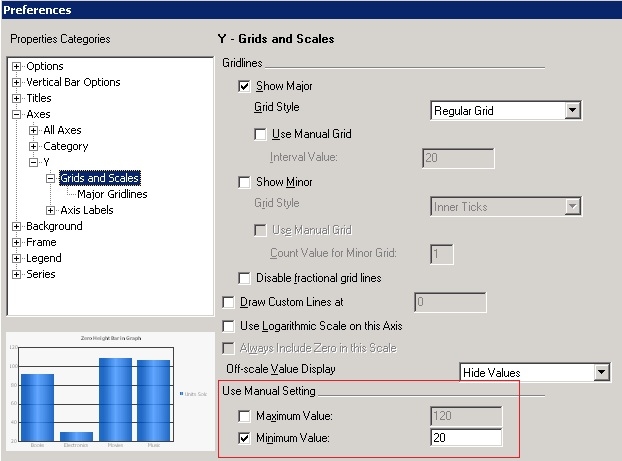
  • Manually set minimum value of Y axis into a smaller value than the minimum value of the series, e.g. 20 as shown below:
     
ka02R000000kXHjQAM_0EM440000002D5k.jpeg


Comment

0 comments

Details

Knowledge Article

Published:

June 19, 2017

Last Updated:

June 19, 2017