EducationSoftwareStrategy.com
StrategyCommunity

Knowledge Base

Product

Community

Knowledge Base

TopicsBrowse ArticlesDeveloper Zone

Product

Download SoftwareProduct DocumentationSecurity Hub

Education

Tutorial VideosSolution GalleryEducation courses

Community

GuidelinesGrandmastersEvents
x_social-icon_white.svglinkedin_social-icon_white.svg
Strategy logoCommunity

© Strategy Inc. All Rights Reserved.

LegalTerms of UsePrivacy Policy
  1. Home
  2. Topics

KB41506: Default Table Prefix has been set in Graphical Architect but is not applied to Warehouse Catalog Options in MicroStrategy Developer 9.4.x-10.x


Stefan Zepeda

Salesforce Solutions Architect • Strategy


Default Table Prefix has been set in Graphical Architect but is not applied to Warehouse Catalog Options in MicroStrategy Developer 9.4.x-10.x.

SYMPTOM:
Default Table Prefix has been set in Graphical Architect but is not applied to Warehouse Catalog Options in Strategy Developer 9.4.x-10.x.
STEPS TO REPRODUCE:
  • Open Tutorial project in Developer, and go to Menu -> Schema -> Architect. Select 'Project Tables View' tab in graphical Architect.
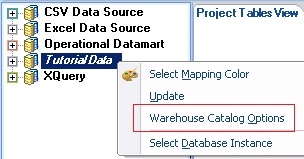
  • Right mouse click on the 'Tutorial Data' Database Instance -> Warehouse Catalog Options, as shown below:
ka02R000000kcdyQAA_0EM440000002D5m.jpeg
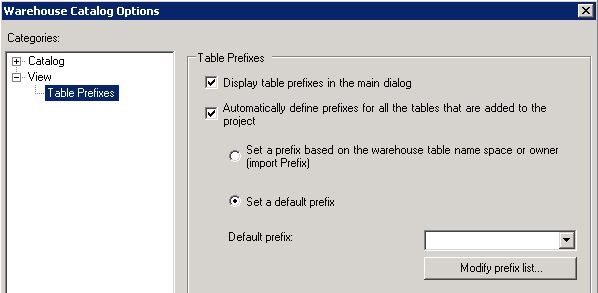
  • Under Categories -> View -> Table Prefixes, check 'Automatically define prefixed for all the tables that are added to the project' option and select 'Set a default prefix' option, as shown below:
ka02R000000kcdyQAA_0EM440000002D5i.jpeg
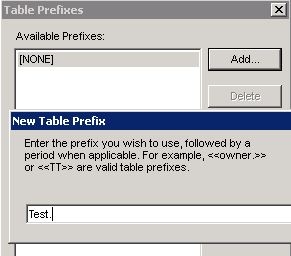
  • Click on "Modify prefix list" and click on Add to create a new table prefix. 'Test.' is used as the example, as shown below:
ka02R000000kcdyQAA_0EM440000002D5Z.jpeg
  • Click on OK to save the change.
  • Save and close the Graphical Architect.
  • Update Schema.
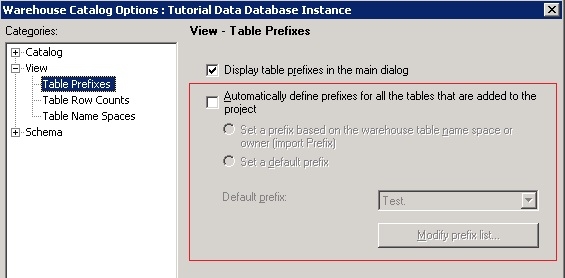
  • Go to Menu -> Schema -> Warehouse Catalog, and open Warehouse Catalog Options.
  • Under Categories -> View -> Table Prefixes, the 'Automatically define prefixed for all the tables that are added to the project' option is not selected, as shown below:
ka02R000000kcdyQAA_0EM440000002D5j.jpeg

CAUSE:
This is a known issue with Strategy Developer 9.4.x-10.x.
ACTION:
Strategy will continue to investigate and post updates as soon as they are available.


Comment

0 comments

Details

Knowledge Article

Published:

April 7, 2017

Last Updated:

April 7, 2017