EducationSoftwareStrategy.com
StrategyCommunity

Knowledge Base

Product

Community

Knowledge Base

TopicsBrowse ArticlesDeveloper Zone

Product

Download SoftwareProduct DocumentationSecurity Hub

Education

Tutorial VideosSolution GalleryEducation courses

Community

GuidelinesGrandmastersEvents
x_social-icon_white.svglinkedin_social-icon_white.svg
Strategy logoCommunity

© Strategy Inc. All Rights Reserved.

LegalTerms of UsePrivacy Policy
  1. Home
  2. Topics

KB415325: When using Consolidation or Custom Group as Selector the option "Apply selections as a filter" is grayed out in MicroStrategy 9.x


Stefan Zepeda

Salesforce Solutions Architect • Strategy


This knowledge base article explains an feature enhancement when using Consolidation or custom group.

SYMPTOM:
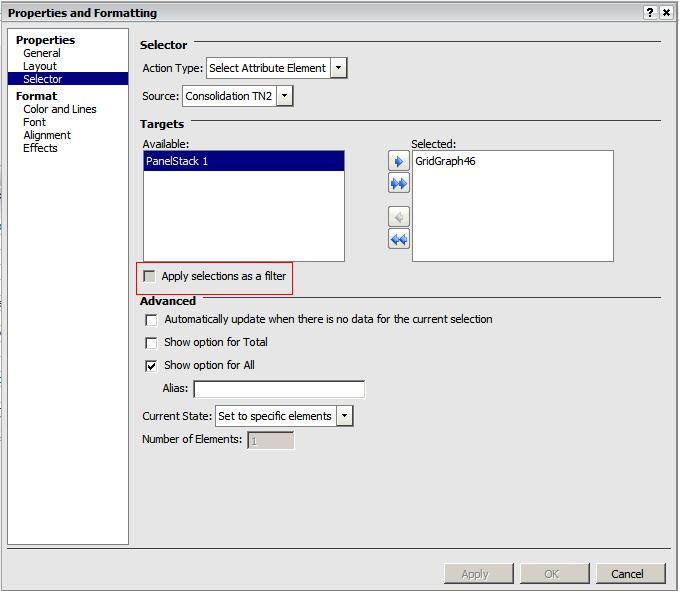
When using a Custom Group or Consolidation as a selector, the option Apply selections as a filter is grayed out under the selector properties in Strategy 9.x.
STEPS TO REPRODUCE:
Follow the steps below in order to reproduce this issue using the Strategy Tutorial project:
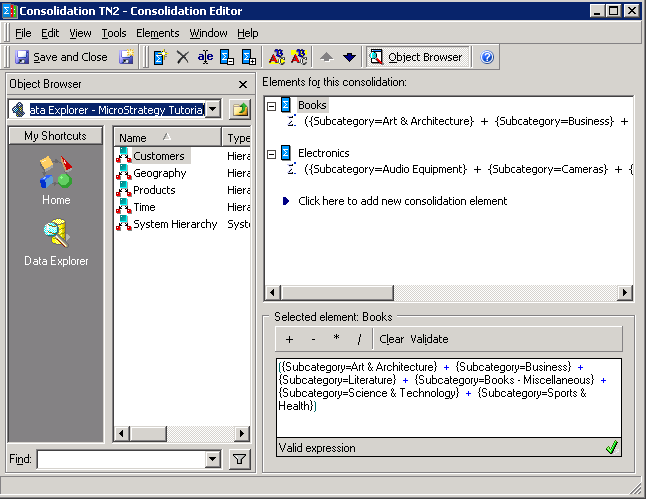
 

  • Create a Consolidation based on the elements of the attribute Subcategory, as shown below
     
ka044000000kJNIAA2_0EM440000002DCo.png
  • Create a Report and add the newly created Consolidation.
  • Create a Document using the newly create report as dataset.
  • Insert a selector and set the Consolidation as Source.
  • Add the report to the document body.
  • Right mouse click on the selector and select Properties.
  • Click on the tab Selector to see that the Apply selection as a filter option is grayed out, as shown below.
     
ka044000000kJNIAA2_0EM440000002DCv.png

 
CAUSE:
 
Currently, this feature is not available for Selectors based on Custom Group and Consolidation. An enhancement request has been logged for this feature.
 
ACTION:
 
Contact Strategy Technical Support for an update on this issue.
 
KB415325


Comment

0 comments

Details

Knowledge Article

Published:

April 7, 2017

Last Updated:

January 1, 2019