EducationSoftwareStrategy.com
StrategyCommunity

Knowledge Base

Product

Community

Knowledge Base

TopicsBrowse ArticlesDeveloper Zone

Product

Download SoftwareProduct DocumentationSecurity Hub

Education

Tutorial VideosSolution GalleryEducation courses

Community

GuidelinesGrandmastersEvents
x_social-icon_white.svglinkedin_social-icon_white.svg
Strategy logoCommunity

© Strategy Inc. All Rights Reserved.

LegalTerms of UsePrivacy Policy
  1. Home
  2. Topics

KB415344: "This key is already associated with an element of this collection" error message appears when trying to browse Subscriptions in Microstrategy Developer 9.x


Stefan Zepeda

Salesforce Solutions Architect • Strategy


"This key is already associated with an element of this collection" error message appears when trying to browse Subscriptions in Microstrategy Developer 9.x

SYMPTOM:
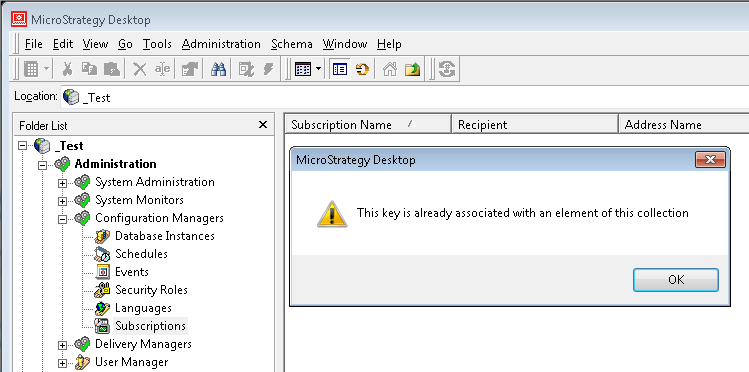
It is not possible to browse the list of subscriptions available by expanding Administration > Configuration Managers > Subscriptions under the Project Source in Strategy Developer 9.x. The following error message is shown:
 

ka02R000000kV3VQAU_0EM440000002DDS.png

 
Sample Code/Error
This key is already associated with an element of this collection
 
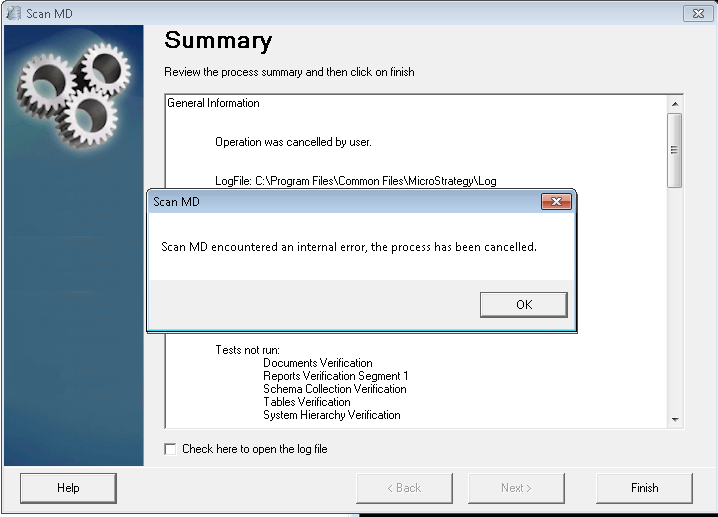
If the Strategy ScanMD tool is executed against the affected metadata, then the error message below will be displayed:
 

ka02R000000kV3VQAU_0EM440000002DDX.png

 
Sample Code/Error
Scan MD encountered an internal error, the process has been cancelled.
 
CAUSE:
This behavior has been reported in Strategy Developer 9.x, however its root cause is unknown.
 
ACTION:
 
Please, contact the Strategy Technical Support for further assistance. In order to track down the cause of the inconsistency, customers encountering this issue should make note of schema-related changes, Object Migrations, or error messages prior to experiencing the problem. Change Journaling, if it has been enabled, can help in preserving this information.
 
WORKAROUND:
 
The list of available Subscriptions may be obtained in the following ways:

  1. Clicking on the My Subscriptions link in Strategy Web.
  2. Using the LIST ALL SUBSCRIPTIONS FOR PROJECT "<project_name>" outline in Strategy Command Manager.

 
The Strategy Internal Reference for the issue discussed in this technical note is 607121.
 
 
KB415344


Comment

0 comments

Details

Knowledge Article

Published:

May 11, 2017

Last Updated:

December 12, 2018