SYMPTOM:
When setting up LDAP authentication on Strategy Intelligence Server 9.4.1/10.x, the following error message is seen when testing the connection to the LDAP server:

Sample Code/Error
An error occurred during authentication. Please contact your administrator: required LDAP components could not be found or are not v3 compliant
The LDAP connectivity file specified in the LDAP Connectivity Wizard appears similar to the image below:
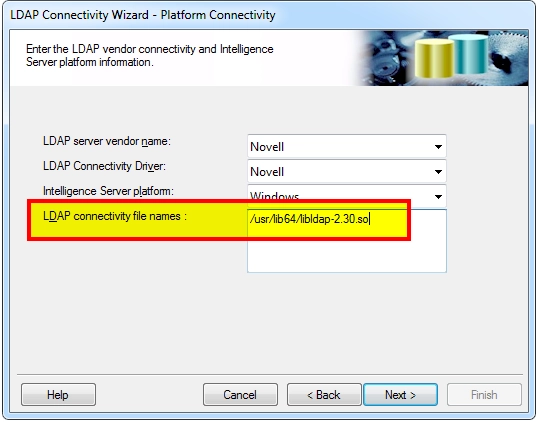
However, when looking in the DSSErrors.log, the user sees the following entries, the file name does not match the connectivity file name specified in the wizard:

CAUSE:
The error message displayed is a generic error indicating that the Strategy Intelligence Server was unable to find the required ldap functionality in the specified library file. Users should be aware that only specific LDAP connectivity SDKs are supported depending on the operating system platform for the Intelligence Server.
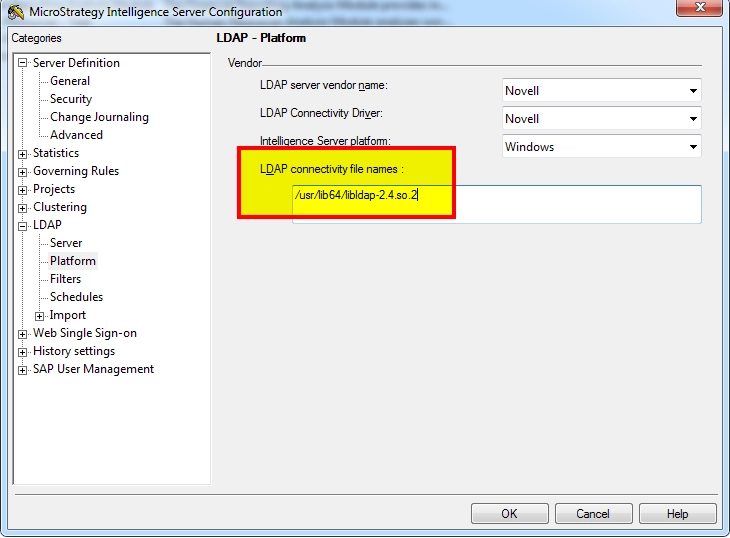
A cause for this error is the wrong LDAP connectivity file name is being used by default by the server as specified in the LDAP - Platform menu from the Intelligence Server Configuration. This can happen even though the user puts the correct connectivity file names in the LDAP Connectivity Wizard.
ACTION:
Change the connectivity file name to the correct value directly in the Intelligence Server Configuration - LDAP - Platform configuration screen:
KB415346
