EducationSoftwareStrategy.com
StrategyCommunity

Knowledge Base

Product

Community

Knowledge Base

TopicsBrowse ArticlesDeveloper Zone

Product

Download SoftwareProduct DocumentationSecurity Hub

Education

Tutorial VideosSolution GalleryEducation courses

Community

GuidelinesGrandmastersEvents
x_social-icon_white.svglinkedin_social-icon_white.svg
Strategy logoCommunity

© Strategy Inc. All Rights Reserved.

LegalTerms of UsePrivacy Policy
  1. Home
  2. Topics

KB41543: "Cannot login by using the NT User account" error message appears when accessing MicroStrategy Office using Windows Authentication


Community Admin

• Strategy


"Cannot login by using the NT User account" error message appears when accessing MicroStrategy Office using Windows Authentication

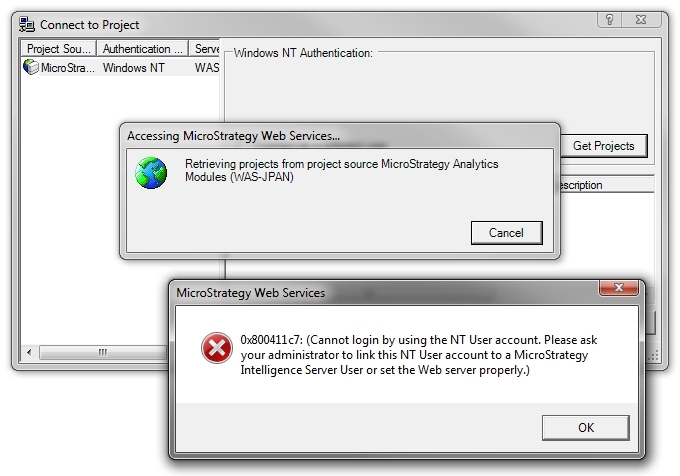
After following KB9691 on how to configure Windows Authentication for Strategy Office 9.2.1 when Strategy Web Services 9.2.1 is hosted on a Windows IIS server, users are still unable to login. When users attempt to retrieve the list of projects for the project source configured to use Windows Authentication, users are prompted with one or both of these error messages:


ka04W000000OajkQAC_0EM4400000026xs.jpeg


0x800411c7: (Cannot login by using the NT User account. Please ask your administrator to link this NT User account to a Strategy Intelligence Server User or set the Web server properly).
ka04W000000OajkQAC_0EM4400000026xp.jpeg


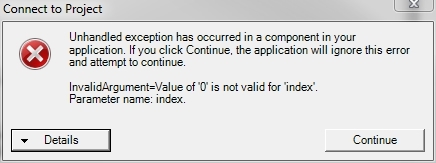
Unhandled exception has occurred in a component in your application. If you click Continue, the application will ignore this error and attempt to continue.

InvalidArgument=Value of '0' is not valid for 'index'.

Parameter name: index.
 
CAUSE:
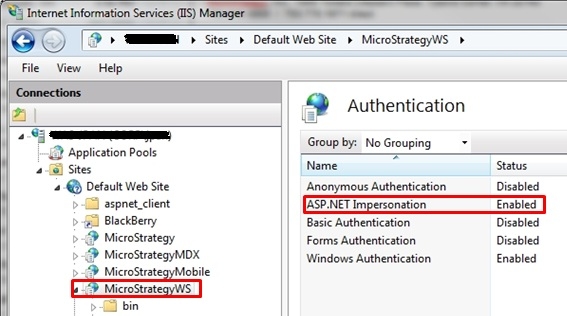
On the Windows IIS server, ASP.NET impersonation is not enabled. ASP.NET impersonation is a new feature of IIS 7, thus is not covered by the technical note mentioned above that was written before its release.
ACTION:
Ensure that ASP.NET impersonation is enabled, like shown below:
 

ka04W000000OajkQAC_0EM4400000026xu.jpeg


Comment

0 comments

Details

Knowledge Article

Published:

June 1, 2017

Last Updated:

March 26, 2018