EducationSoftwareStrategy.com
StrategyCommunity

Knowledge Base

Product

Community

Knowledge Base

TopicsBrowse ArticlesDeveloper Zone

Product

Download SoftwareProduct DocumentationSecurity Hub

Education

Tutorial VideosSolution GalleryEducation courses

Community

GuidelinesGrandmastersEvents
x_social-icon_white.svglinkedin_social-icon_white.svg
Strategy logoCommunity

© Strategy Inc. All Rights Reserved.

LegalTerms of UsePrivacy Policy
  1. Home
  2. Topics

KB41544: How to merge row headers in the Grid visualization in Visual Insight with MicroStrategy Web 9.x


Community Admin

• Strategy


This article describes how to merge the row headers in Visual Insight MicroStrategy Web 9.x

SYMPTOM
When users create a Grid visualization in Visual Insight using Strategy Web 9.x, users may notice that the row headers are not merged, like shown below:
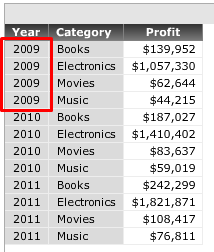
ka04W000000OhnCQAS_0EM440000002HNY.png

 
ACTION
Follow the steps below to merge the row headers into a single entry:
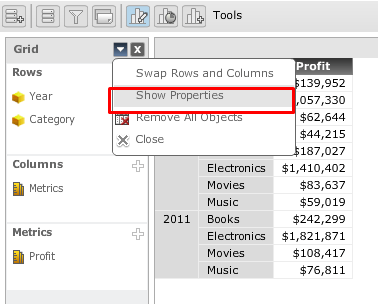
  • From the Visual Insight toolbar, click on the Edit Visualization icon to bring up the Edit Visualization Pane.
  • From the Edit Visualization Pane, click on the drop-down menu button near the close button and select 'Show Properties', like shown below:
ka04W000000OhnCQAS_0EM440000002HNT.png
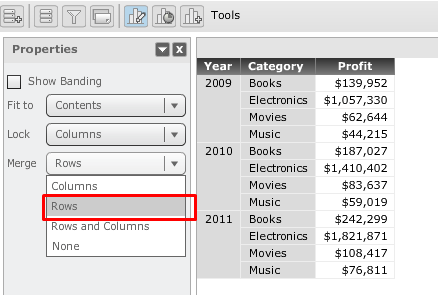
  • From the Properties pane > 'Merge' options select 'Rows', like shown below:
ka04W000000OhnCQAS_0EM440000002HNS.png

Upon making this selection, the row headers will now be merged, as shown above.


Comment

0 comments

Details

Knowledge Article

Published:

April 13, 2017

Last Updated:

April 13, 2017