SYMPTOM:
Users who send emails containing HTML Documents through Strategy Distribution Services 9.x and 10.x and Microsoft Outlook 2007 may experience emails which appear Right Justified.
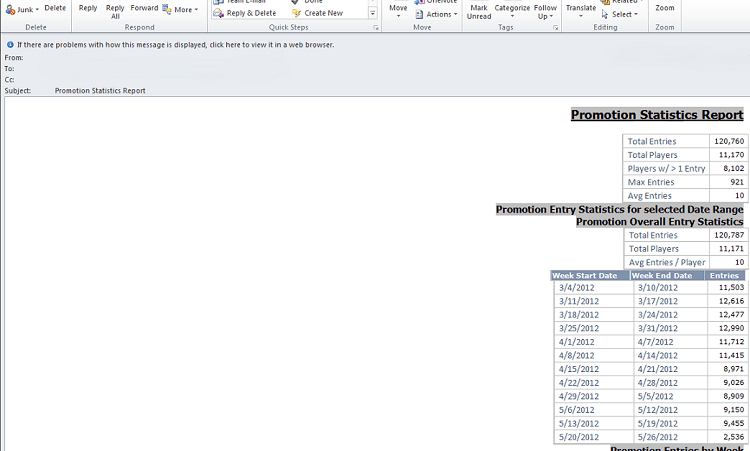
CAUSE:
If sending HTML documents through Strategy Distribution Services to a Microsoft Outlook 2007 Client, the Delivery Device must have the following option enabled: "Use only tables to position elements in HTML (Enable for Microsoft Outlook 2007)".
ACTION:
The "Use only tables to position elements in HTML (Enable for Microsoft Outlook 2007)" setting must be enabled in the Delivery Device Settings through Strategy Desktop.
In order to enable this setting, edit the device used for email delivery (i.e. Generic Email Device )through Administration > Delivery Managers > Devices. The edit screen should appear, and then click the 'Options' button.
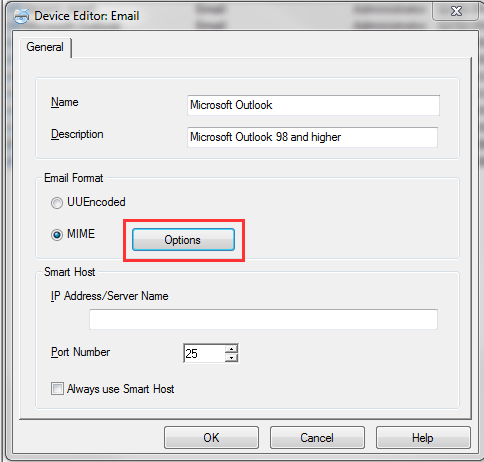
A screen will appear after 'Options' has been clicked, which will contain available MIME: Options. From this screen, it will be required to enable the following setting: "Use only tables to position elements in HTML (Enable for Microsoft Outlook 2007)".
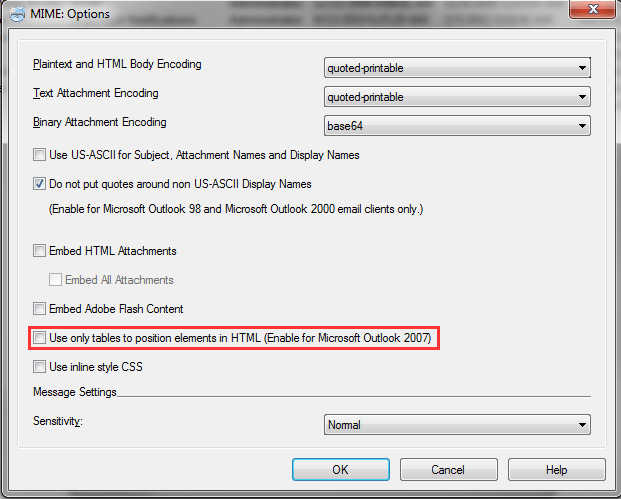
After enabling this feature, click OK to save this setting. Future emails using this device will be properly justified for Microsoft Outlook 2007 Users.
