EducationSoftwareStrategy.com
StrategyCommunity

Knowledge Base

Product

Community

Knowledge Base

TopicsBrowse ArticlesDeveloper Zone

Product

Download SoftwareProduct DocumentationSecurity Hub

Education

Tutorial VideosSolution GalleryEducation courses

Community

GuidelinesGrandmastersEvents
x_social-icon_white.svglinkedin_social-icon_white.svg
Strategy logoCommunity

© Strategy Inc. All Rights Reserved.

LegalTerms of UsePrivacy Policy
  1. Home
  2. Topics

KB41601: "The object shown in the following hierarchy no longer exists in schema: -Link-TableObject is not found in DFCSchema during DFC conversion" error message appears when updating project schema ONLY in 3 tier in MicroStrategy Desktop 9.3.x


Stefan Zepeda

Salesforce Solutions Architect • Strategy


SUMMARY: 
This technical document describes an error which occurs when updating project schema. 
SYMPTOM:
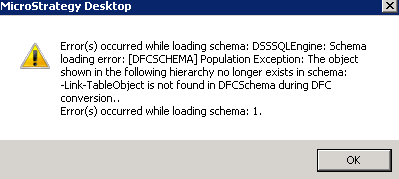
When updating project schema ONLY in 3 tier in Strategy Desktop 9.3.x, following error message appears:
ka02R000000kcheQAA_0EM440000002D04.png


Error(s) occurred while loading the schema: DSSSQLEngine: Schema loading error: Population Exception: The object shown in the following hierarchy no longer exists in the schema : -Link- Table Object is not found in DFCSchema during DFC conversion. Error(s) occured while loading schema:1.

This issue does not happen in 2 tier.
CAUSE:
This is a known issue in Strategy Desktop 9.3.x. A possible cause is that a Fact's source table is missing in project schema.
ACTION:
Run the Schema common tests using latest version of ScanMD.  If that does not resolve the issue then contact Strategy Technical Support for further assistance.


Comment

0 comments

Details

Knowledge Article

Published:

April 4, 2017

Last Updated:

April 4, 2017