SYMPTOM:
When the ACL for a folder is set at the user level with custom privileges the user who copy reports into that folder does not get Full Control on his own objects.
Scenario 1: ACL set at the Group level where user abc is member of the group.
1. Set the ACL for the TestACL folder on the object and child as shown below in the screenshots:
Custom ACL for the Object:

Custom ACL for the Child:

2. User abc copies a report from My Reports to this folder (TestACL)
3. The user gets Full Control on the report as shown below in the screenshot.
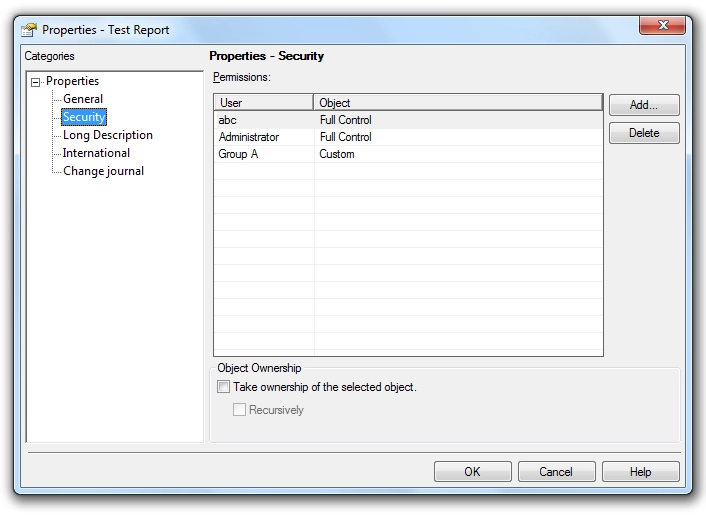
Scenario 2: ACL set at the User level.
1. Set the ACL for the TestACLUser folder on the object and child as soon in the screenshots above.
2. Now when the user abc copies a report from My Reports to this folder (TestACLUser)
3. The user gets Custom permissions on the report as shown below in the screenshot.

CAUSE:
When the ACL of the destination folder is granted with custom permission (i.e.Write - Deny for its Children) at user level there is a conflict when the user tries to copy the report into this folder.
1. From the ACL at the source report (i.e reports from My Folder); the user has Full Control. i.e. Write - Grant.
2. From the ACL at the destination folder (i.e TestACLUser Folder); the user has custom permission i.e. Write - Deny.
At this point for the conflict; the resolution between Write - Grant and Write - Deny would be a Write - Deny and the ACL set at the user level will have more priority. Thus the user gets custom permission on the report instead of Full Control.
ACTION:
In order to give the user Full Control; the custom previlege should be set as Write - Grant for the Children at the folder level.
KB416386
