EducationSoftwareStrategy.com
StrategyCommunity

Knowledge Base

Product

Community

Knowledge Base

TopicsBrowse ArticlesDeveloper Zone

Product

Download SoftwareProduct DocumentationSecurity Hub

Education

Tutorial VideosSolution GalleryEducation courses

Community

GuidelinesGrandmastersEvents
x_social-icon_white.svglinkedin_social-icon_white.svg
Strategy logoCommunity

© Strategy Inc. All Rights Reserved.

LegalTerms of UsePrivacy Policy
  1. Home
  2. Topics

KB41644: How to customize the share URL displayed in 'show link' feature in MicroStrategy Web


James Sutcliffe

Principal Sales Engineer • MicroStrategy


How to customize the share URL displayed in 'show link' feature in MicroStrategy Web

Description 

In Strategy Web, objects have a 'Share' option available in the right-click menu to get the URL which can be used to share it with the other users. The base URL which contains the Web server name as shown below, cannot be modified out-of-the-box.
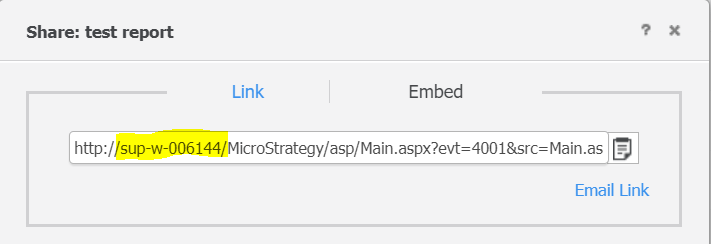
 

ka04W00000147tJQAQ_0EM4W0000071ceJ.jpeg

This technical note describes the steps to customize the URL.

Why is this happening? 


This is occurring because Strategy Web is behind a reverse proxy. 
 

Solution

  • Open the Strategy.xml file found under the following directory on the Web server:
    Note: Following best practices, save a backup of this file before modifying.

    
    <root MSTR web directory>\WEB-INF\


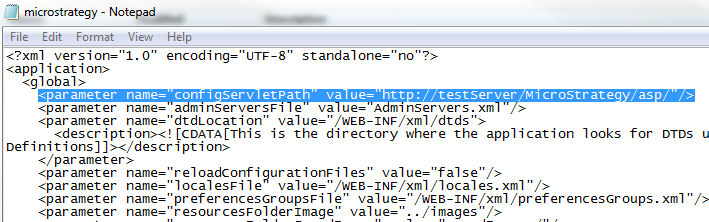
  • Add a new parameter "configServletPath" under the global node with value for the desired base URL. 
    Example:
    
    <parameter name="configServletPath" value="http://<web server>:port/Strategy.../"/>
    

    NOTE:  for JSP (Tomcat) applications, the link would follow the format: "https://testServer:port/MicroStrategy/servlet/"
     
    Like shown below:  

ka04W00000147tJQAQ_0EM4400000026wL.png
  •  Restart the web server for the change to take effect.
     

CUSTOMIZATION WARNING:
 
This customization is provided as a convenience to Strategy users and is only directly applicable to the version stated. While this code may apply to other releases directly, Strategy Technical Support makes no guarantees that the code provided will apply to any future or previous builds. In the event of a code change in future builds, Strategy Technical Support makes no guarantee that an updated version of this particular customization will be provided. In the event of a code change in future builds, Strategy may not be able to provide additional code on this matter even though this customization is provided at this time for this specific build. For enhancements to this customization or to incorporate similar functionality into other versions, contact your Account Executive to inquire about Strategy Consulting assistance.
 
KB41644


Comment

0 comments

Details

Knowledge Article

Published:

April 5, 2017

Last Updated:

April 26, 2023