EducationSoftwareStrategy.com
StrategyCommunity

Knowledge Base

Product

Community

Knowledge Base

TopicsBrowse ArticlesDeveloper Zone

Product

Download SoftwareProduct DocumentationSecurity Hub

Education

Tutorial VideosSolution GalleryEducation courses

Community

GuidelinesGrandmastersEvents
x_social-icon_white.svglinkedin_social-icon_white.svg
Strategy logoCommunity

© Strategy Inc. All Rights Reserved.

LegalTerms of UsePrivacy Policy
  1. Home
  2. Topics

KB416739: The folder naming convention for Version Upgrade History has changed with MicroStrategy Developer 9.x and higher


Stefan Zepeda

Salesforce Solutions Architect • Strategy


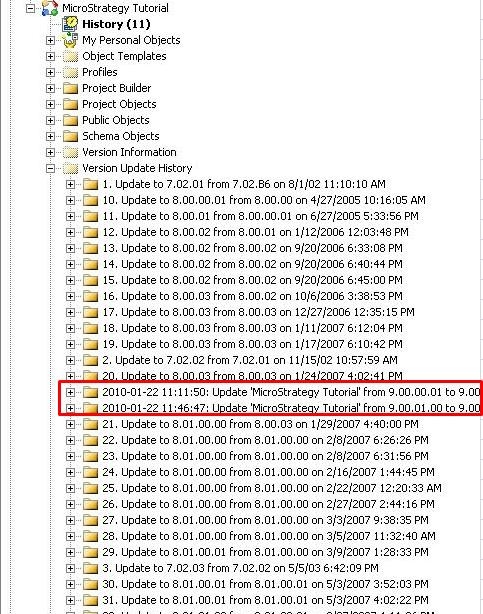
Users with metadata that has been upgraded from versions prior to 9.0 will notice a difference in the folder name in the Update History folder.

SYMPTOM:
The Version Update History can be found in the form of folder names under the hidden folder called "Version Update History." For more information, refer to: 
KB8046: How to determine the upgrade history of the metadata in Strategy Developer.
Unlike the folder names created for 8.x and lower versions, the folder names for version 9.0.0 and above start with YYYY-MM-DD hh:mm:ss followed by the project name as highlighted below:
 

ka0PW0000001VMjYAM_0EM440000002E2P.jpeg

 
CAUSE:
This is a known issue with Strategy Developer 9.0.0 and above. Currently, there is no option to alter this format to make adjustments to ensure consistency.
 
ACTION:
Strategy will continue to investigate and post updates as soon as they are available.
 
KB416739


Comment

0 comments

Details

Knowledge Article

Published:

June 8, 2017

Last Updated:

April 8, 2024