EducationSoftwareStrategy.com
StrategyCommunity

Knowledge Base

Product

Community

Knowledge Base

TopicsBrowse ArticlesDeveloper Zone

Product

Download SoftwareProduct DocumentationSecurity Hub

Education

Tutorial VideosSolution GalleryEducation courses

Community

GuidelinesGrandmastersEvents
x_social-icon_white.svglinkedin_social-icon_white.svg
Strategy logoCommunity

© Strategy Inc. All Rights Reserved.

LegalTerms of UsePrivacy Policy
  1. Home
  2. Topics

KB41686: "Error: SQLEngine got an Exception from DFC: [DFCENGINE] AppObj Logic: ERROR: Cannot generate SQL for given attribute." error message when running a report in MicroStrategy Developer 9.x-10.x


Stefan Zepeda

Salesforce Solutions Architect • Strategy


SYMPTOM:
 
When running a report in Strategy 9.x-10.x, the follow error message appears:


Error: SQLEngine got an Exception from DFC: AppObj Logic: ERROR: Cannot generate SQL for given attribute.
 
CAUSE:
 
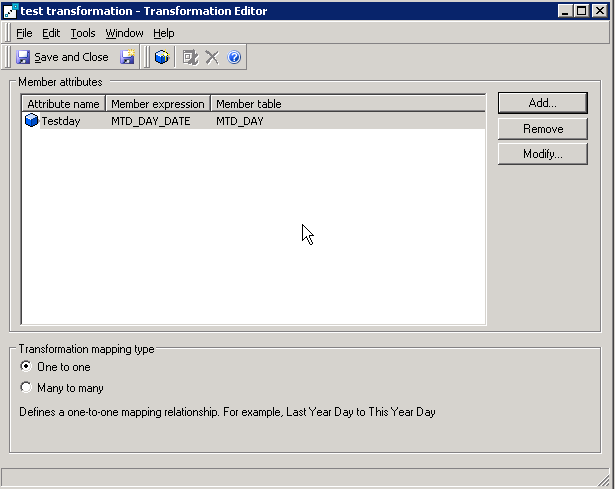
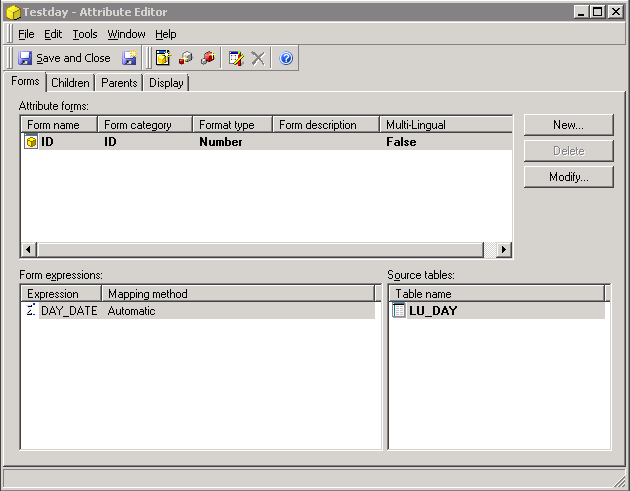
This error message can be caused if the Member table in a transformation is not a source table for the Member attribute. This in turn, can be caused by a migration where the transformation is migrated after the attribute and 'Use Existing' is selected as the conflict resolution action for the dependency check of the attribute.
 
For example, if the transformation has member Attribute Testday using member table MTD_DAY but the attribute Testday does not have MTD_DAY as a source table as shown below, the error can occur.
 

ka02R000000kcCRQAY_0EM440000002D4t.png
ka02R000000kcCRQAY_0EM440000002D4r.png

 
ACTION:
 
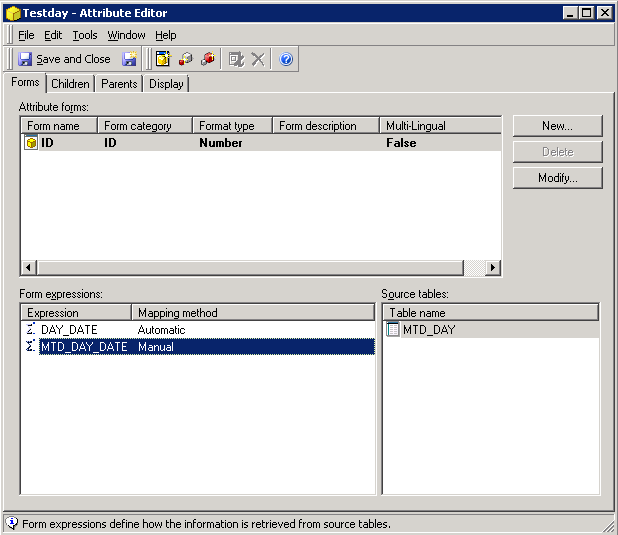
Modify the attribute and add the member table used for the transformation as a source table to the attribute. In the example above, table MTD_DAY must be added as a source table for attribute Testday.
 

ka02R000000kcCRQAY_0EM440000002D4v.png


Comment

0 comments

Details

Knowledge Article

Published:

May 22, 2017

Last Updated:

May 22, 2017