EducationSoftwareStrategy.com
StrategyCommunity

Knowledge Base

Product

Community

Knowledge Base

TopicsBrowse ArticlesDeveloper Zone

Product

Download SoftwareProduct DocumentationSecurity Hub

Education

Tutorial VideosSolution GalleryEducation courses

Community

GuidelinesGrandmastersEvents
x_social-icon_white.svglinkedin_social-icon_white.svg
Strategy logoCommunity

© Strategy Inc. All Rights Reserved.

LegalTerms of UsePrivacy Policy
  1. Home
  2. Topics

KB41703: How to embed hyperlinks in the message box of Email Subscriptions and Alerts in MicroStrategy Web


Community Admin

• Strategy


When creating an email subscription through MicroStrategy Web, hyperlinks can be added to the message section of the email using a specific format.

When creating an email subscription through Strategy Web, hyperlinks can be added to the message section of the email by using the following format:


<html><a href="web page URL">Text shown in message</a></html>

 
ACTION
 
1. Create an Alert Subscription and include:
 

<html><a href="http://www.google.com">Google Link</a></html>
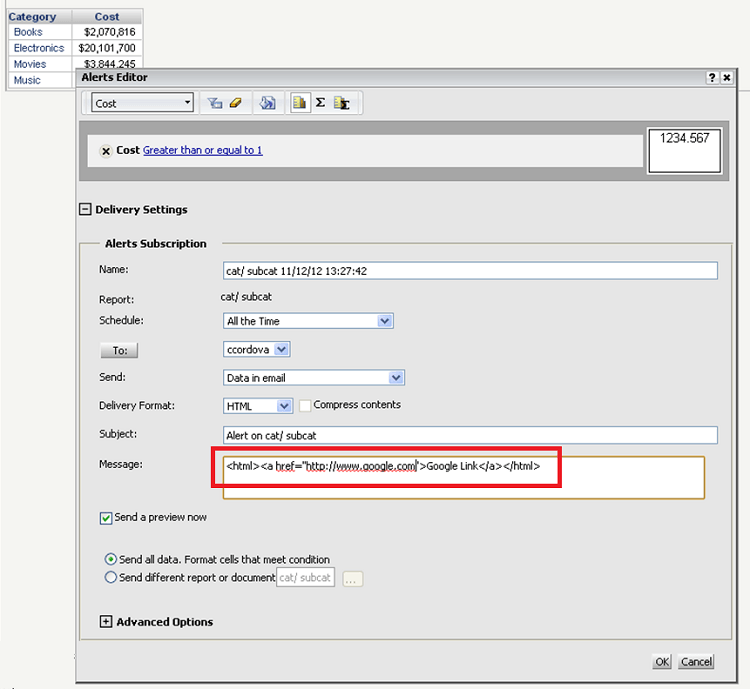
 
in the Message box, as shown below.
 

ka04W000000OhlFQAS_0EM4400000026v6.png

 
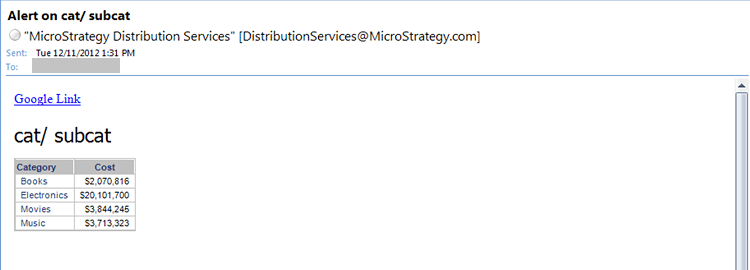
2. When the alert is generated, a link will be generated with the hyperlink specified in the message, as shown below.
 

ka04W000000OhlFQAS_0EM4400000026v4.png

 
Note: Refer to KB33306 for questions regarding the character limit of the message body field.


Comment

0 comments

Details

Knowledge Article

Published:

April 16, 2017

Last Updated:

April 16, 2017