EducationSoftwareStrategy.com
StrategyCommunity

Knowledge Base

Product

Community

Knowledge Base

TopicsBrowse ArticlesDeveloper Zone

Product

Download SoftwareProduct DocumentationSecurity Hub

Education

Tutorial VideosSolution GalleryEducation courses

Community

GuidelinesGrandmastersEvents
x_social-icon_white.svglinkedin_social-icon_white.svg
Strategy logoCommunity

© Strategy Inc. All Rights Reserved.

LegalTerms of UsePrivacy Policy
  1. Home
  2. Topics

KB41704: How to lock column headers on a grid inside a Report Services Document in MicroStrategy Web 9.x and 10.x


Community Admin

• Strategy


This technical note describes how to lock column headers on a grid in a Report Services Document in MicroStrategy 9.x and 10.x

SUMMARY:
In Strategy Web 9.x and 10.x it is possible to lock the column headers of a grid on a document without modifying the report. 
ACTION:
In Strategy Web 9.x and 10.x:
  • Create a report and do not enable lock column headers.  
  • Save the report.
  • Create a new document and add the report as a dataset to the document. 
  • Add the report as a grid to the document.
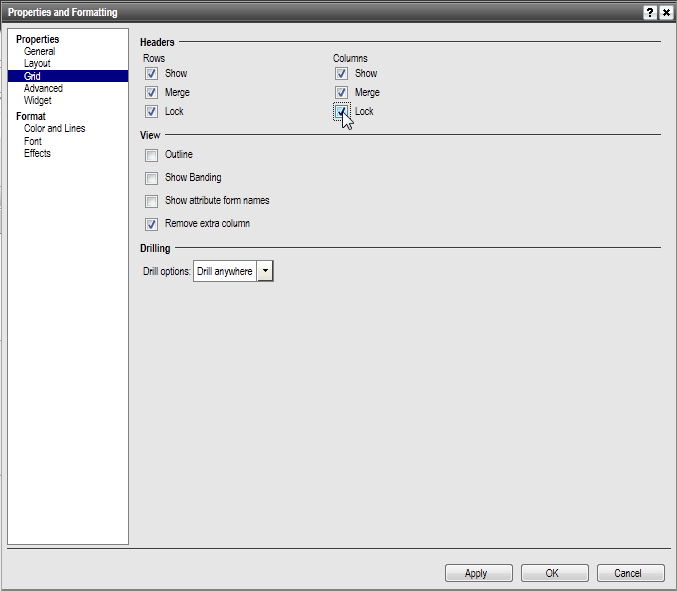
  • With the document in either Design or Editable modes, right click on the graph and select Properties and Formatting.  
  • Under Properties, select Grid.  
  • Under the Headers section, there are check boxes for Lock under both Rows and Columns.  
  • Select these boxes to lock the row or column headers.  
  • Once selected, press OK.
     
ka04W000000OhW4QAK_0EM4400000026vd.png

Run the document in Presentation, Express, Interactive, Editable, or Flash modes and notice that the header and/or row headers remain in place when scrolling through the report.  If the original report is executed, lock column and row headers will not be enabled.


Comment

0 comments

Details

Knowledge Article

Published:

May 17, 2017

Last Updated:

May 17, 2017