EducationSoftwareStrategy.com
StrategyCommunity

Knowledge Base

Product

Community

Knowledge Base

TopicsBrowse ArticlesDeveloper Zone

Product

Download SoftwareProduct DocumentationSecurity Hub

Education

Tutorial VideosSolution GalleryEducation courses

Community

GuidelinesGrandmastersEvents
x_social-icon_white.svglinkedin_social-icon_white.svg
Strategy logoCommunity

© Strategy Inc. All Rights Reserved.

LegalTerms of UsePrivacy Policy
  1. Home
  2. Topics

KB41710: The "Dynamic address lists" option does not appear under User Preferences when seting up a dynamic address list for Distribution Services subscriptions in MicroStrategy Web 9.3.0


Community Admin

• Strategy


The "Dynamic address lists" option does not appear under User Preferences when seting up a dynamic address list for Distribution Services subscriptions in MicroStrategy Web 9.3.0

SYMPTOM:
 
The "Dynamic address lists" option does not appear under User Preferences in Strategy Web 9.3.0 when setting up a dynamic address list for Distribution Services subscriptions as described in KB41561: How to setup dynamic address list for Distribution Services subscriptions in MicroStrategy 9.3.x and newer.
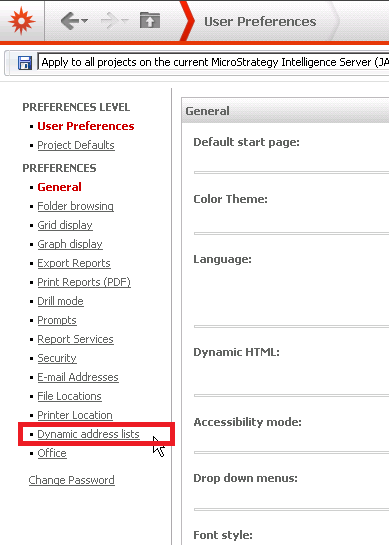


ka04W000001MKvuQAG_0EM4400000026vG.png

 
CAUSE:
Two of the possible causes for the issue are:

  1. The 'Dynamic address lists' option does not appear in the Preferences when the user doesn't have permission to create dynamic address list. If this is the case, then the issue would appear to be user specific.
  2. If the issue is not user specific, when upgrading from a previous version of Strategy to Strategy Web 9.3.0, the preferencesGroups.xml file didn't update correctly  If this is the cause, all users including administrator will not see the option for "Dynamic address lists". This is a known issue in Strategy Web 9.3.0

 
ACTION:
 
For option 1 when dynamic address list is not shown for some users:
In Strategy Desktop, 
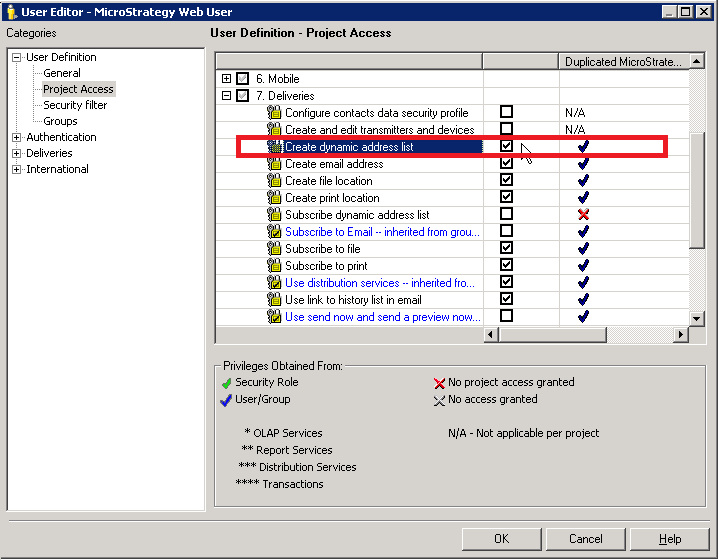
  • Go to the User Editor by logging into a project source, navigating to Administration, User Manager, and then to the specific user or user group affected.  
  • Right click the user or user group and select Edit. 
  • Expand User Definition, select Project Access, and expand "7. Deliveries".  
  • Ensure that the permission for "Create dynamic address list" is selected, as shown in the image below.
ka04W000001MKvuQAG_0EM4400000026v3.png

 For Option 2 when the dynamic address list is not shown for any user including the administrator user: 
 
To confirm if the file was not upgraded correctly, follow these steps.

  1. Navigate to the preferencesGroups.xml file on the web server machine at the below location. 

    Sample Code/Error
    Strategy\Web ASPx\WEB-INF\xml

  2. View the file, search for the term "dynamic address list", and look for code similar to below.  
ka04W000001MKvuQAG_0EM4400000026vE.png

 
If searching for "dynamic address list" returns no results, contact Strategy Technical Support for an update on this issue.


Comment

0 comments

Details

Knowledge Article

Published:

April 4, 2017

Last Updated:

April 4, 2017