As per technote KB11029 Smart Metrics are usually ignored in Strategy Datamart reports. This is done to increase performance so that reports do not run through the Strategy Analytical Engine but instead are run directly against the database and no data needs to be brought back to Strategy. This causes the SQL to change so that the Smart Metric that is normally calculated in the Analytical Engine is instead calculated in the database.
If the calculation being done in the database is causing incorrect values or is not wanted there is a workaround so that Analytical Engine values will be used in Datamart reports.
To ensure Smart Metrics will be treated as smart and that metric calculations are done in the Analytical Engine. A Custom Group or Consolidation needs to be used in the report. This can be any Custom Group or Consolidation. A good example is a consolidation on the year attribute or any attribute that does not have many elements.
A report with a Smart Metric like Profit Margin as shown below will not have the metric calculation done in the Analytical Engine if it only has attributes on the grid as well.
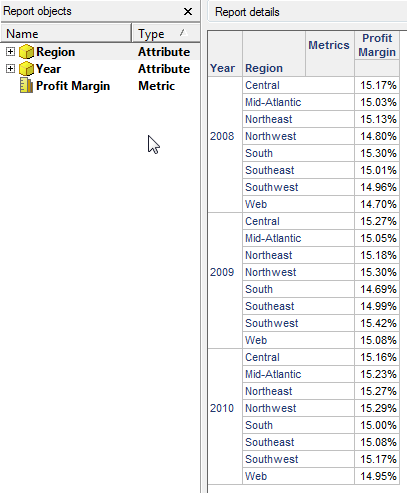
If the report is made into a Datamart report the SQL for the datamart will look like below.
Sample Code/Error
SQL Statements:
create table testdatamart (
Year_ID LONG,
REGION_ID SHORT,
REGION_NAME0 TEXT(50),
WJXBFS1 DOUBLE)
insert into testdatamart
select a13. AS Year_ID,
a12. AS REGION_ID,
max(a14.) AS REGION_NAME0,
(sum((a11. - a11.)) / IIF(sum(a11.) = 0, NULL, sum(a11.))) AS WJXBFS1
from a11,
a12,
a13,
a14
where a11. = a12. and
a11. = a13. and
a12. = a14.
group by a13.,
a12.
Notice the highlighted section, the Profit Margin calculation of Profit divided by Revenue is moved to the database and is not done in the Analytical Engine.
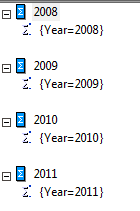
To move the calculation back to the Analytical Engine create a Consolidation or Custom Group on the Year attribute. The Consolidation should be set up so that every element of the Consolidation is a Year as shown below.
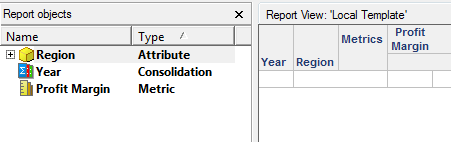
Replace the Year attribute with the Year Consolidation and run the Datamart report.
SQL Statements:
select a13. AS Year_ID,
a12. AS REGION_ID,
max(a14.) AS REGION_NAME0,
sum(a11.) AS Revenue,
sum((a11. - a11.)) AS WJXBFS1
from a11,
a12,
a13,
a14
where a11. = a12. and
a11. = a13. and
a12. = a14.
and a13. in (2008, 2009, 2010, 2011)
group by a13.,
a12.
drop table testdatamart
create table testdatamart (
ELM_ID LONG,
ELM_NAME TEXT(254),
REGION_ID SHORT,
REGION_NAME0 TEXT(50),
WJXBFS1 DOUBLE)
insert into testdatamart values (3, '2008', 1, 'Northeast', 0.1513432272)
The Profit Margin calculation is no longer done on the database side. Notice the highlighted section where the Profit and Revenue metrics are calculated on there own, but the profit margin calculation of Profit divided by Revenue is not in SQL. It is calculated in the Analytical Engine and then inserted into the Datamart in table in the last insert statement.
Note: Adding this Custom Group or Consolidation will decrease performance for Datamart reports. It will add additional steps using the Analytical Engine that will add time to the report execution.
KB41712
