EducationSoftwareStrategy.com
StrategyCommunity

Knowledge Base

Product

Community

Knowledge Base

TopicsBrowse ArticlesDeveloper Zone

Product

Download SoftwareProduct DocumentationSecurity Hub

Education

Tutorial VideosSolution GalleryEducation courses

Community

GuidelinesGrandmastersEvents
x_social-icon_white.svglinkedin_social-icon_white.svg
Strategy logoCommunity

© Strategy Inc. All Rights Reserved.

LegalTerms of UsePrivacy Policy
  1. Home
  2. Topics

KB41726: How to make a metric dynamically adopt one of the two axes in a dual axis graph in MicroStrategy Developer 9.4.x-10.x


Stefan Zepeda

Salesforce Solutions Architect • Strategy


This article demonstrate how to design a metric that dynamically adopts one of the two axes in a dual axis graph

In some business scenarios, it is required to make a metric dynamically adopt one of the two axes in a dual axis graph in Strategy Developer 9.4.x-10.x.
 
The following steps demonstrate how to design this kind of report in Strategy Tutorial project:
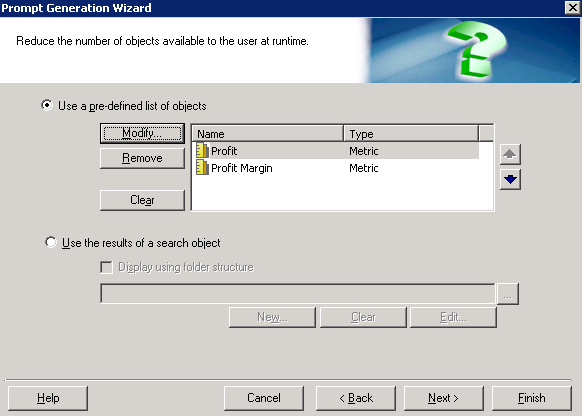
  1. In Strategy Developer , create two object prompts "Metric_Prompt1" and "Metric_Prompt2" with same definition as shown below:
ka02R000000kWFHQA2_0EM440000002D3D.png


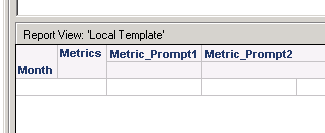
  • Create a report with Month in rows and two prompts in columns as shown below:
ka02R000000kWFHQA2_0EM440000002D3H.png


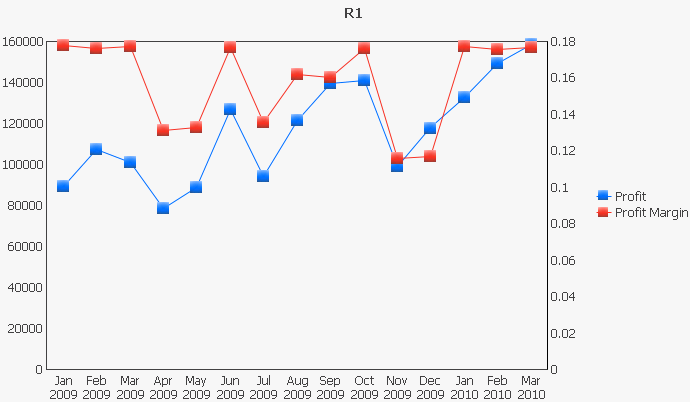
  • Run the report in dual axis line graph mode. Choose Profit as answer for Metric_Prompt1 and Profit Margin for Metric_Prompt2. Profit will use left axis while Profit Margin will use right axis as shown below:
ka02R000000kWFHQA2_0EM440000002D3B.png


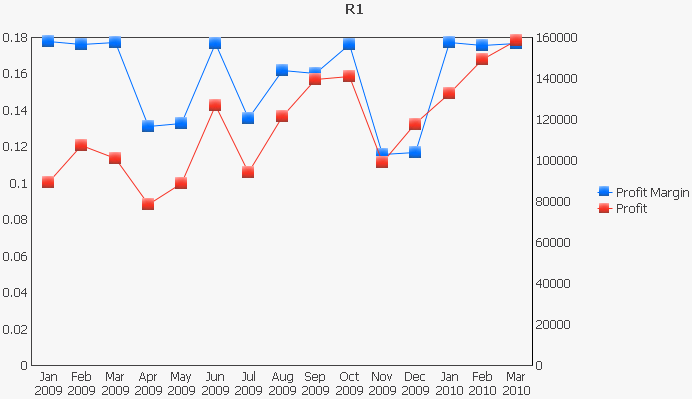
  • Re-prompt the report. Choose Profit Margin for Metric_Prompt1 and Profit for Metric_Prompt2. Profit will use right axis while Profit Margin will use left axis as shown below:
ka02R000000kWFHQA2_0EM440000002D3F.png

 
The position of a metric in the template determines the default axis used to display data of this metric. Object prompt can help to dynamically change the position of metrics in template. Therefore, user can dynamically decide which axis will be used for a metric by dynamically changing the answers for object prompts.


Comment

0 comments

Details

Knowledge Article

Published:

April 20, 2017

Last Updated:

April 20, 2017